The advent of the Slack chat program and its custom emoji and reactji has inspired me to break out Inkscape a number of times, usually mightily assisted by Open Clip Art artists, to express sentiments not yet captured by the Unicode consortium, such as NOPE or BAN AUSTRALIA.
Some of my emoji are already leaking out into the Slackerverse; it’s time to set them all free, and spread the nopetopus and no fucks far and wide! Get your puzzlemoji from the Gitlab repository or download them directly from this page.
All these emoji are public domain (I’d love to see you work out how to credit them inline), but I appreciate a shoutout where possible. In turn, credits for images I adapted can be found in “More information” links.
:banaustralia:
Let’s face it, banning Australia is the leastyou can do, ban early and often.
One of my most undeservedly praised emoji in terms of how much I adapted the source material! :trashfire: involved taking this image and removing several objects from it. Voilà!
There are all kinds of reasons to want to uterise your chat, both positively and negatively. The extreme ends of attitudes to uteruses can now be expressed in reactji:
The best way to express What The Fuck sentiments is obviously and forever via baking a WTF cake (hat tip Selena Deckelmann). Now in nommable emoji form!
Graphics have been spicing up my writing and slidedecks over my fifteen years as a writer and a public speaker; the simpler and more attractive the better. But it’s not easy to put them there.
I’ve had the good fortune to also have been an amateur photographer the whole time, and have taught myself some basic image editing skills, so when I find an image that’s not quite right but could be, I pop it in an image editor, twiddle a reliable and small set of dials, and out emerges something more eye-catching. Lucky me. And lucky you: the tricks to turn a photo into something simpler and more eye-catching are simple, and today is the day I share my version of them.
Are you a wordsmith more than an visual person? Are you a writer or a public speaker who appreciates the power of a strong visual in other people’s pieces and slide decks, and wish you could just twiddle a few dials and make it happen with your own images? Do you want to make featured images for a WordPress theme, or something to break up a millionty paragraphs of text, or a colourful image to re-engage your audience in your talk? Do you sometimes have an idea of what you want but the images your searches dig up are just a bit flat for your purposes? This is for you.
This entry covers two topics: first, finding existing images that you can make work for you without any further editing. Win! And the next level: when you have an idea of what you want, and you have a photo that… doesn’t quite tell that story… but could… it’s time to make some quick and dirty edits to liven it up. Make the colours a little stronger or stranger, eliminate some clutter, and pull out some detail. Your illustrations are complete!
Eye-catching photos for wordsmiths: principles
Eye-catching images accompanying to your writing or speaking should be brain candy: simple subjects that people can identify at a glance; high contrast so that most people can understand what they’re seen quickly; and understand at a glance; and brightly or interestingly coloured because it’s eye-catching and fun. Your illustrations will usually be a subtlety-free zone.
Luckily simple, colourful, and easy to understand is an appealing set of things to have in a photo, so you’ll often be able to find free photos that you can use without editing. But there’s also a very simple set of tools that will let you take an existing photo and up its simplicity and eye-catching for your work. Finding first; then failing that, editing.
Finding images
Use photos that the photographer allows to be used and changed by other people! The Creative Commons system provides photographers and others with a way to give you this right.
To find images with Creative Commons licences that match my needs, I head on over to Flickr search, with Commercial use & mods allowed selected in the “Any licence” drop down. A couple of Flickr search tips:
search for generic terms. If you’re looking to make a point about time, first search for “clock” and “watch” and “sundial”, not things like “clock showing noon” or “bedside clock”. Images are often fairly generically labelled by their creator and you miss some good stuff by going specific.
use Flickr’s “Interesting” search tool. There’s a dropdown labelled “Relevant” — by default Flickr is trying to find images whose textual description and tags best match your search term. Try changing it to “Interesting”, to instead find somewhat matching images that are very popular on Flickr. This will often bias towards images that are already technically good, highly saturated, have an unusual subject or setting, and similar; exactly the kind of eye-catching things you want for your blog post or slide deck.
Flickr isn’t the only Creative Commons game in town: there’s also Wikimedia Commons or Google Images (after your search, go to “Search tools”, then “Usage rights” then “Labeled for reuse with modification”.
Caution: often images found this way must still be credited to their creator. Learn more here. Caution: be careful of images with recognisable people in them. The permission you got to use the image was from the photographer, not the subject. Ethically, the person in the photo may not wish to have their likeness appear with your content, and in some cases using images of people may be restricted by personality rights or privacy rights. It’s usually best to skip images of people, or to buy them from a reputable stock image site.
The point of this tutorial is to make adjustments to some of the most common “knobs” you can twiddle on digital images. If you want to start making edits, and you already have a tool in mind, look up how to crop, how to auto adjust levels, how to change saturation, how to change contrast, and how to change brightness in your chosen graphics software.
In this tutorial, I’ve made the edits to images with Pinta, a free and comparatively simple graphics program for Windows, Mac, and Linux. I haven’t used them, but Paint.NET is a widely recommended equivalently straightforward Windows image editor, and Pixelmator seems highly recommended on Mac.
Editing photos to be eyecatching: short version
crop the image so that the subject of interest comprises most of the image, and is off-center
try auto-level colour adjustments
try somewhat increasing one or more of contrast and saturation, perhaps while twiddling brightness up or down
also try decreasing saturation
That’s it! If you want examples of what this looks like in action, read on!
Editing photos to be eyecatching: with examples
Meet our original images
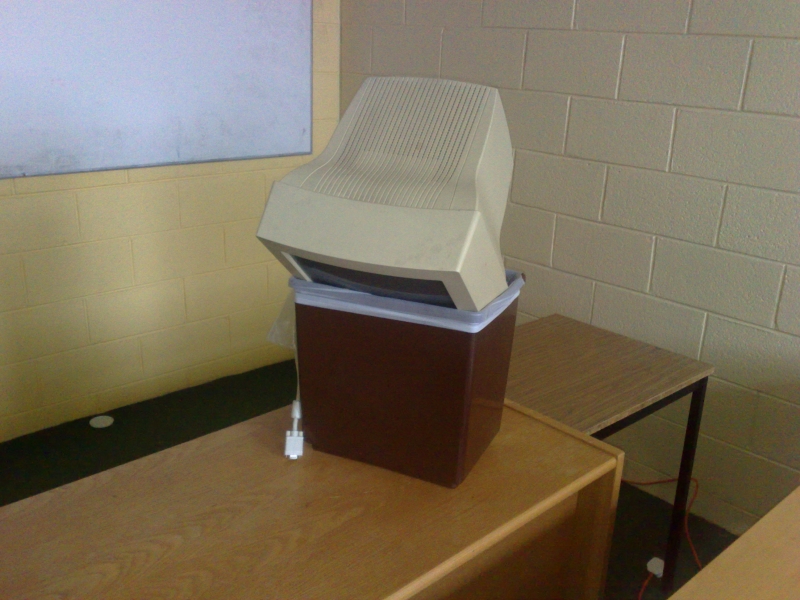
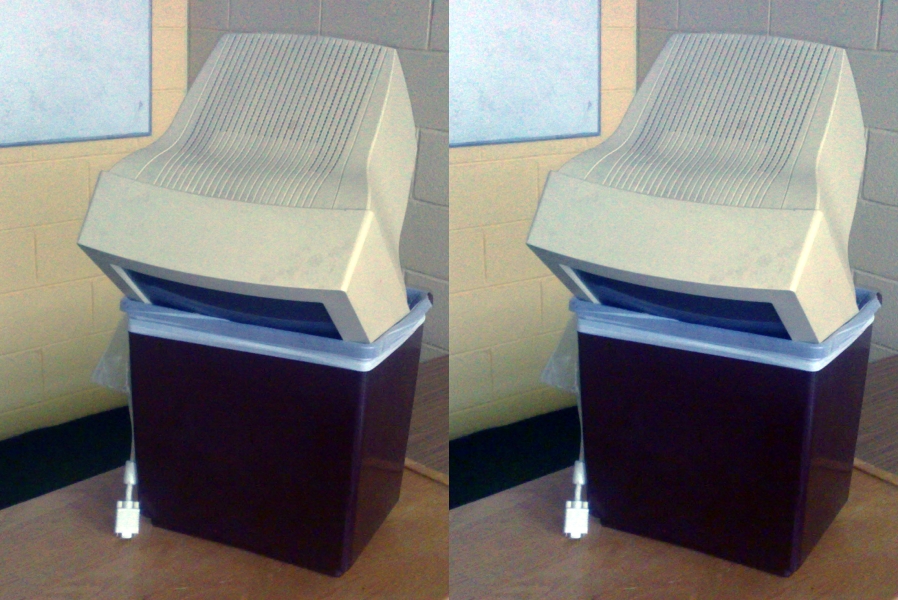
Old Computer by Sean MacEntee. Old Computer is a surprisingly rare beast: a freely licenced photo of a computer that is being discarded. I find it easy to find great photos for search terms like apple or pen, less so for “computer in trash”. It’s a problem when you write complaints about computers a lot.
Old Computer has two major limitations if you wanted it for your condemnation of the tech industry or your rage at discarding electronics into landfill:
it’s “flat” colour-wise: there’s a lot of very similar beige-y colours in the image
there’s a lot of classroom in the shot and not a lot of computer-in-bin
by Sean MacEntee
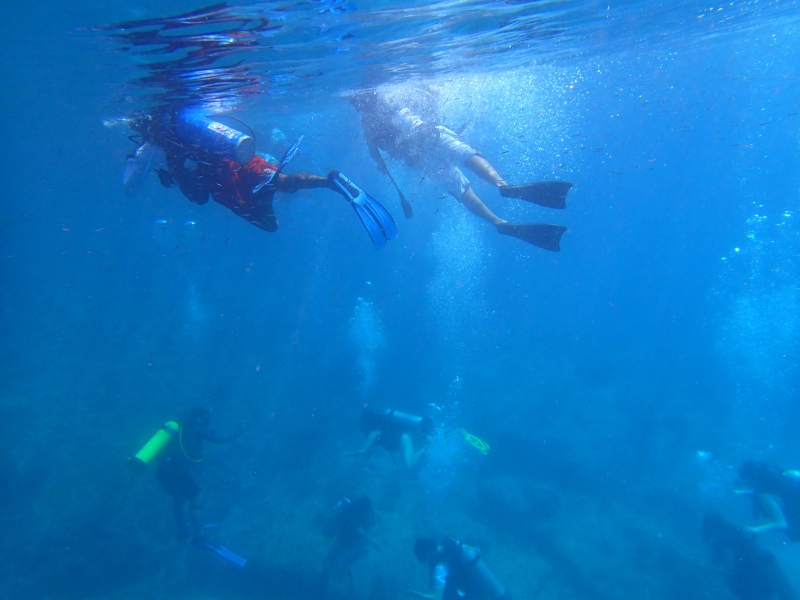
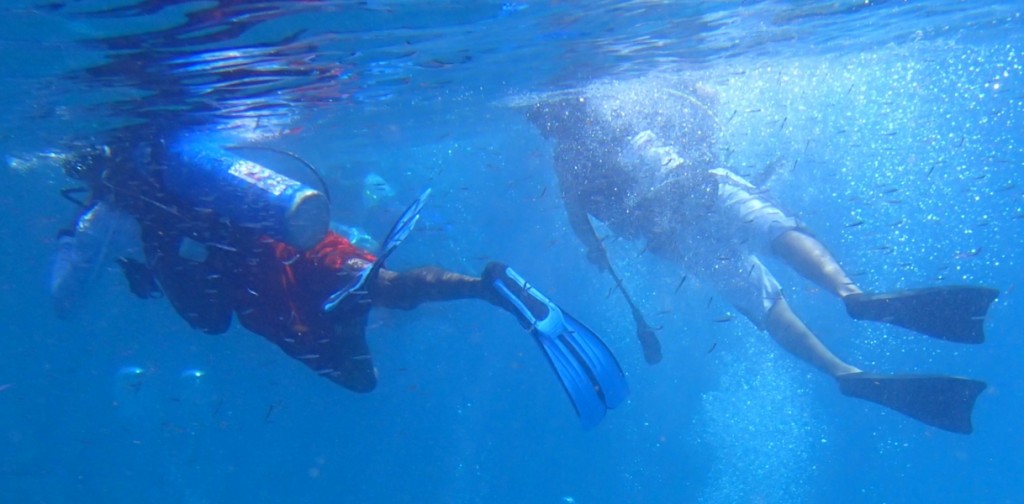
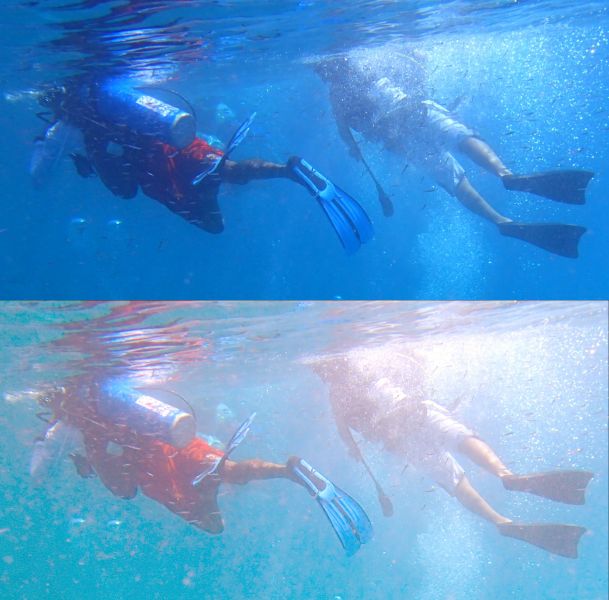
PC270246 by NickDun (hereafter called SCUBA). This is a very evocative shot of what scuba diving in a group is like and would be a great addition to your story of getting your mask kicked off by that so-and-so who probably certified yesterday, but:
it’s a very typical shot taken with an underwater camera, that is, it’s extremely blue-tinted
there’s a lot going on in it; if you want to talk about sunlight and freedom, or if you want to talk about crowds of divers, you may only want to illustrate your post with part of the image
by NickDun CC BY-SA
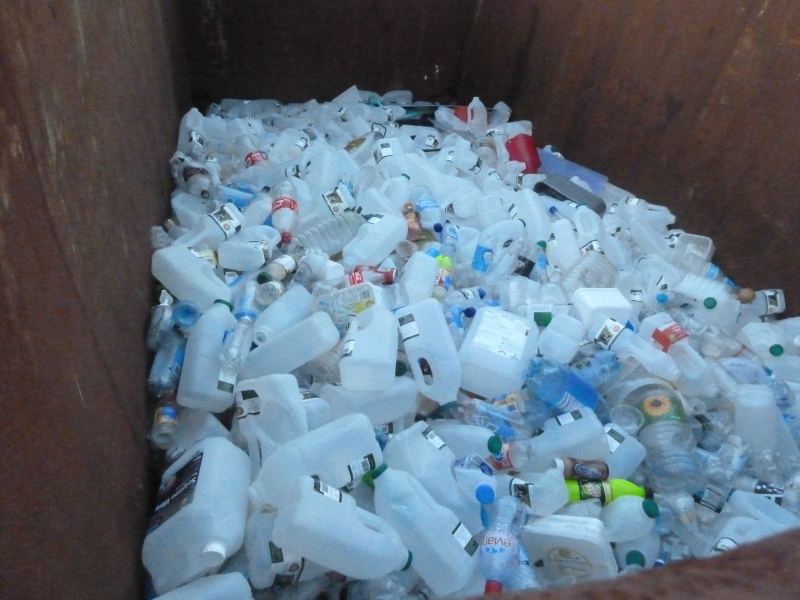
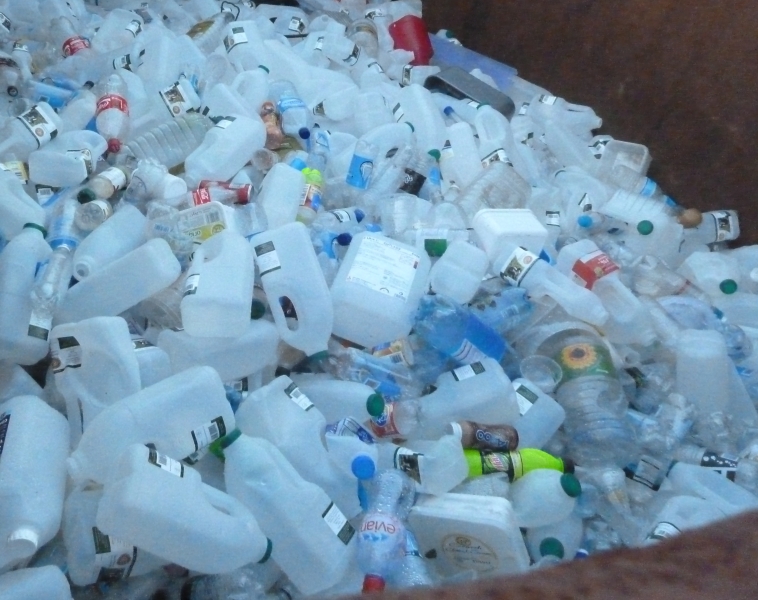
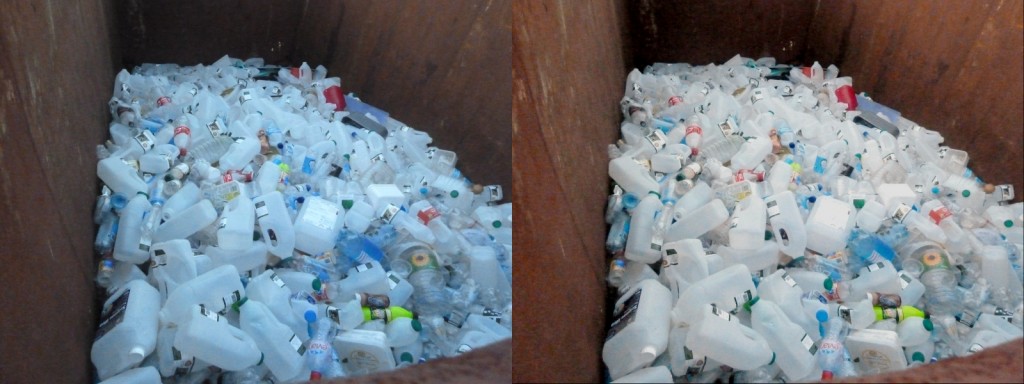
Big Rubbish Project: Eden Project 2011 by University of Exeter (hereafter called Big Rubbish). What can I say? Garbage is a versatile metaphor and images of garbage are useful. This image is visually striking: there’s lots of repetition and patterns, and not a lot of extraneous clutter in the surrounding scene. But it also has rather dim, flat colours.
by University of Exeter
Step 1: crop
Old Computer has an issue with a lot of surrounding space; and SCUBA has two separate things going on in it. This we are going to fix by cropping the image. Cropping means cutting out some of the photo. Where possible, you want to cut out other unrelated objects, and large expanses of foreground and background.
Cropping principle: have the object of interest filling most of the photo, slightly off center.
In Pinta, select the Rectangle Select tool, drag to draw a rectangle over the bits of the image you want to keep, and then go to the Image menu and select Crop to Selection.
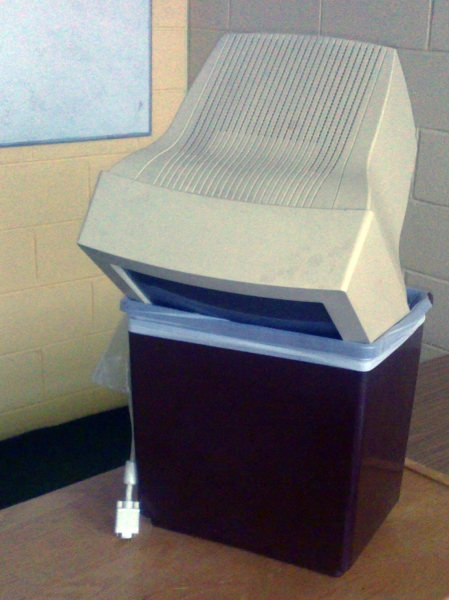
Old Computer, cropped so that the computer and the bin occupy much more of the image:
by Sean MacEntee, cropped by Mary Gardiner
And two crops of SCUBA, the first showing the divers snorkelling at the top of the image and the second showing the divers grouped at the bottom:
by NickDun, cropped by Mary Gardiner, CC BY-SAby NickDun, cropped by Mary Gardiner, CC BY-SA
Honestly I’m a bit sad to crop SCUBA, because the full image is so evocative of the last two or three minutes of SCUBA dives. Let this serve as a lesson: none of this editing is compulsory. Sometimes let less be more.
I’m even more loath to crop Big Rubbish, since as I noted at in its introduction I quite like its current framing. But one possibility with cropped is to change the message of the picture a little. For example, here’s a crop that implies that the extent of the garbage could be much larger:
by University of Exeter, cropped by Mary Gardiner
An even tighter crop, taking out the edges on the bottom and right could imply that it wasn’t well contained.
Having made that illustrative crop, I’ll go back to working with the full version of Big Rubbish in future steps.
Further reading:Rule of Thirds for a guideline on centering or not centering your object of interest.
Step 2: auto level
At the start, we saw that all of Old Computer, SCUBA, and Big Rubbish have “flat colours”. “Auto level” commands are the simplest way to get a good variety of colour levels to diminish this effect.
In Pinta, go to the Adjustments menu, and select Auto Level.
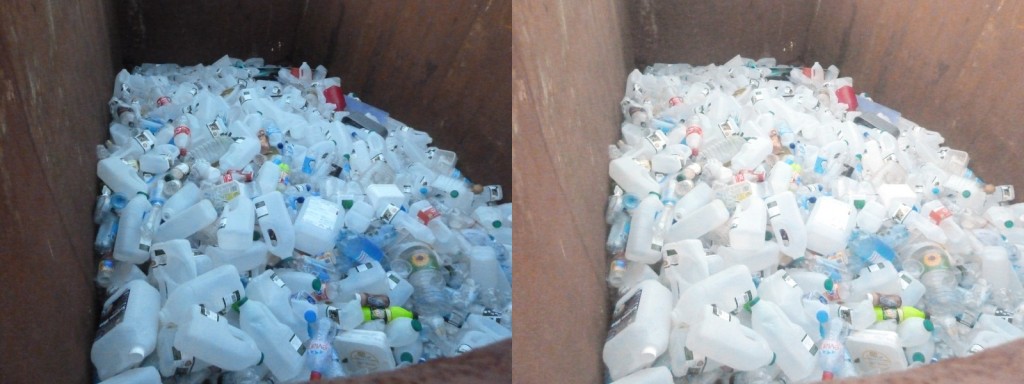
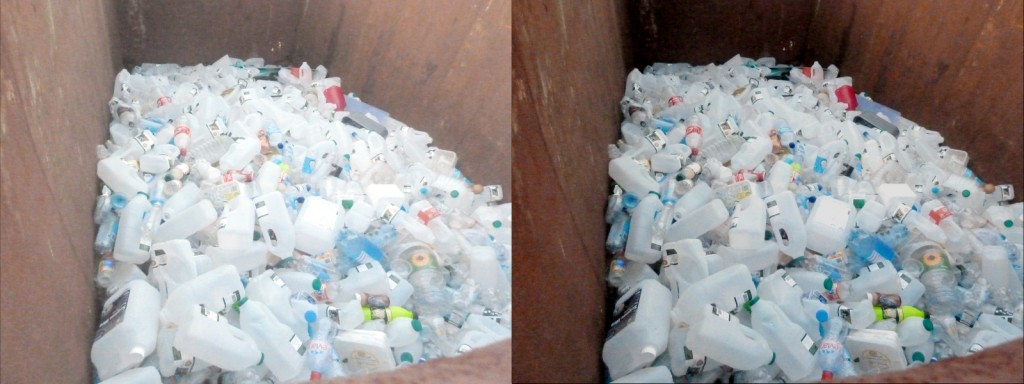
The effect on Big Rubbish is most dramatic and most of an improvement for eye-catching purposes (original on left, auto-levelled on right):
by University of Exeter, duplicated and colour-adjusted by Mary Gardiner
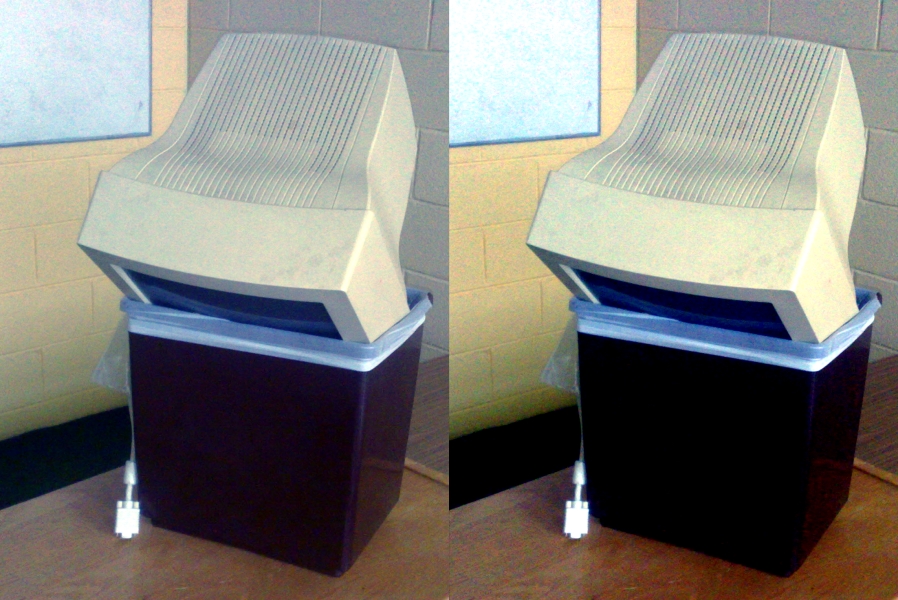
Contrary to (my) expectations, the effect on Old Computer is extremely subtle (original on left, auto-level on right):
by Sean MacEntee, cropped, duplicated, and colour adjusted by Mary Gardiner
But don’t worry, we’re not stopping here with jazzing up Old Computer.
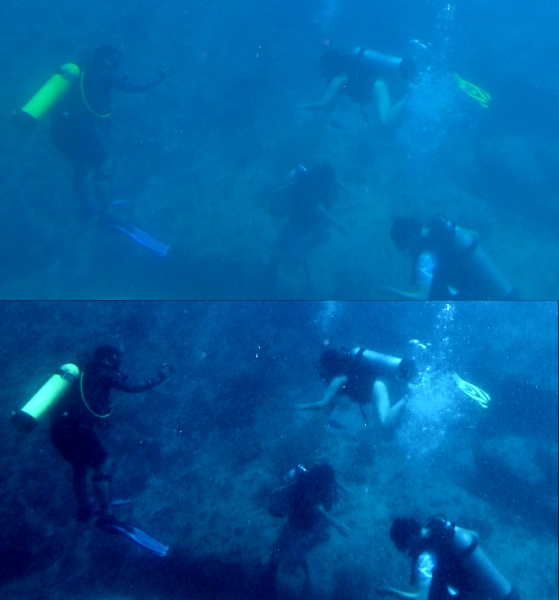
The effect on the two SCUBA shots is dramatic, as it often is with underwater shots. Here’s the top one (original image at top, auto-level at bottom):
by NickDun, cropped, duplicated and colour-adjusted by Mary Gardiner, CC BY-SA
You’ll notice that while the range of colours in the auto-levelled picture is wider, it has not ended up looking especially realistic. Realistic high-fidelity underwater photographs are not easy to produce… but luckily realistic is not our goal here; our goal is striking.
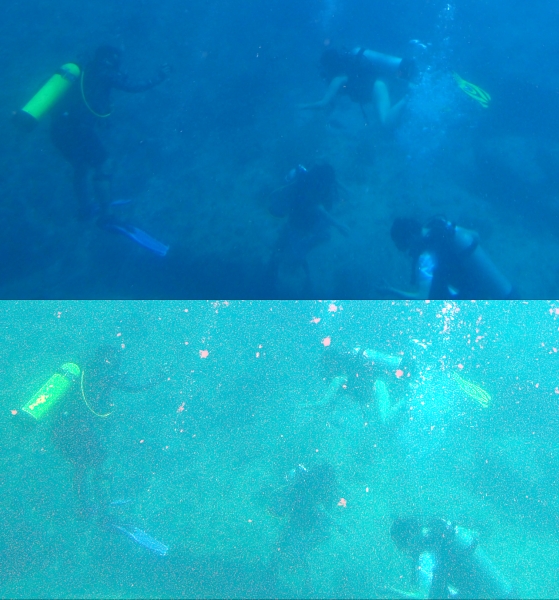
Sadly, the bottom crop of SCUBA is pushing the limits of colour adjustment: if there’s really only blue in the picture, auto-level will find red where-ever it can, no matter how ill-advised (original image at top, auto-level at bottom):
by NickDun, cropped, duplicated and colour-adjusted by Mary Gardiner, CC BY-SA
Not so great. But give auto-levelling a go with any picture you are trying to edit; there’s always an Undo command.
Step 3: increase contrast and saturation
Increasing contrast increases the distinctness of the colours in the image (beyond auto-level); and increasing saturation increases their richness.
In Pinta, go to the Adjustments menu, and choose “Brightness / Contrast” for a contrast slider, and “Hue / Saturation” for a saturation slider.
Here’s Old Computer, with the Saturation slider (which starts at 100) increased to 150, and the Contrast slider (which starts at 0) increased to 30 (auto-levelled version on left, higher contrast and saturation version on right):
by Sean MacEntee, cropped, duplicated, and colour adjusted by Mary Gardiner
And here’s Big Rubbish, with three adjustments. I took Saturation to 130, contrast up to 20, and brightness down to -50 (auto-levelled version on left, higher contrast, higher saturation version, and lower brightness version on right):
by University of Exeter, duplicated and colour-adjusted by Mary Gardiner
Since I’ve made it darker again, and thus more like the original, let’s keep ourselves honest and compare with the original too (original on left, auto-levelled with lower brightness, higher contrast, and higher saturation version on right):
by University of Exeter, duplicated and colour-adjusted by Mary Gardiner
Our version has a lot more red: the bottles are white rather than blue, and the rusty bin has a warm red tone (partly due to auto-levelling and partly due to increasing the saturation dramatically). So auto-levelling and messing with the colours paid off even though I went and reduced the brightness back down to close to the original.
Saturation is a very powerful slider: make your colours richer by increasing saturation.
That said, sometimes you can do a lot just with contrast. Remember what a mess auto-levelling made of the bottom SCUBA picture? I didn’t give up there. Here’s a version based on the original, with brightness increased to 20 and contrast to 70 (original crop on top, higher contrast and higher brightness version on bottom):
by NickDun, cropped, duplicated and colour-adjusted by Mary Gardiner, CC BY-SA
Here manually fiddling with brightness and contrast has pulled some detail out of the picture that auto-levelling didn’t manage to find, and made it much more striking while retaining the other-worldly darkness of SCUBA diving. (Spoiler: your eyes are better than cameras at adjusting, it doesn’t seem that dark while you’re doing it. But you might want to convince your readers or listeners that it is spooky-dark…)
Step three alternative: decrease saturation
Upping saturation to make your rust warm, and your water an inviting sunny-day blue can be very effective, but it’s also worth checking out what effect you get from dialling saturation both ways.
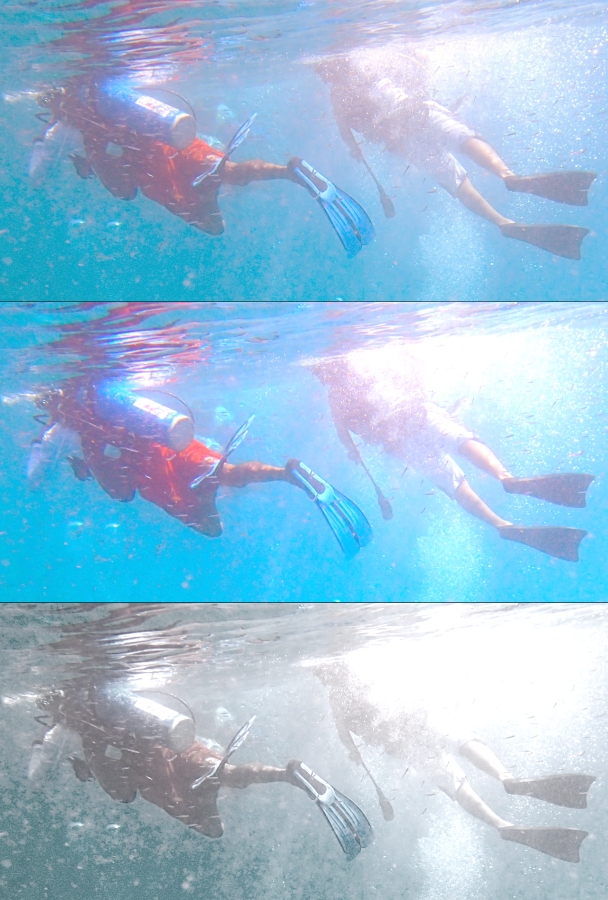
Here’s the top of the SCUBA shot (top version auto-levelled, middle version auto-levelled with contrast increased to 20 and saturation increased to 155, bottom version with contrast increased to 35 and saturation decreased to 25):
by NickDun, cropped, duplicated and colour-adjusted by Mary Gardiner, CC BY-SA
Both of the edits have something to recommend them: the more saturated version in the middle looks like the sunniest dive day in the history of time, and the less saturated version at the bottom looks ethereal and dramatic; my favourite edit that I produced for this post. Try dialling saturation down sometimes, not always and forever up.
And that’s it: you have your basic dials to catch eyes now!
Two minutes to more eye-catching photos
Full disclosure: you’ll have to do a bit of practice to develop your own taste. But here’s your quick steps when you have a photo that could use a bit of “pop” before being added to your writing or your slide deck:
crop the image so that the subject of interest comprises most of the image, and is off-center
try auto-level colour adjustments
try somewhat increasing one or more of contrast and saturation, perhaps while twiddling brightness up or down
also try decreasing saturation
And so wordsmith types: go forth and give people brain candy!
I was involved in the blog on, if not from the first day of its existence, at least from the first week of it. My involvement in the blog was huge, and comprises among other things:
founding and for a long time running the Ask a Geek Feminist, Wednesday Geek Woman and Cookie of the Week series
doing a linkspam post by myself multiple times a week for about a year
recruiting the initial team of Linkspammers and setting up their manual, mailing list and of course, the script that supports them
recruiting several other bloggers, including Tim, Restructure! and Courtney S
a bunch of sysadmin of the self-hosted WordPress install (it’s now hosted on WordPress.com)
My leaving the blog is delayed news. I initially told the co-bloggers I was leaving close to a year ago now (mid-August, if I’d waited much longer on writing this I could have posted on the one year anniversary), because my output had dried up. I feel in large part that what happened was that I spent about ten years in geekdom (1999–2009) accumulating about three years of material for the blog, and then I ran out of things to write about there. I also have two more children and one more business than I had when I was first writing for it, and, very crucially, one less unfinished PhD to avoid. But I had a handover todo list to plod my way through, and Spam All the Links was the last item on it!
I remain involved in Geek Feminism as an administrator on the Geek Feminism wiki, on which I had about 25% of total edits last I looked, although the same sense of being a dry well is there too.
The blog was obviously hugely important for me, both as an outlet for that ten years of pent up opinionating and, to my surprise, because I ended up moving into the space professionally. I’m glad I did it.
Today, I would say these are my five favourite posts I made to the blog:
Terri mention[ed] that she had resisted at times working on things perceived as ‘girl stuff’. In Free Software this includes but is not limited to documentation, usability research, community management and (somewhat unusually for wider society) sometimes management in general. The audience immediately hit on it, and it swirled around me all week.
I do not in fact find writing the wiki documentation of incidents in geekdom very satisfying. The comment linked at the beginning of the post compared the descriptions to a rope tying geekdom to the past. Sometimes being known as a wiki editor and pursued around IRC with endless links to yet another anonymous commenter or well-known developer advising women to shut up and take it and write some damned code anyway is like a rope tying me to the bottom of the ocean.
But what makes it worth it for me is that when people are scratching their heads over why women would avoid such a revolutionarily free environment like Free Software development, did maybe something bad actually happen, that women have answers.
(I’d be very interested in other people’s takes on this in 2015, which is a very different landscape in terms of the visibility of geek sexism than 2009 was.)
This is the kind of advice given by people who don’t actually want to help. Or perhaps don’t know how they can. It’s like if you’re a parent of a bullying victim, and you find yourself repeating “ignore it”, “fight back with fists” or whatever fairly useless advice you yourself were once on the receiving end of. It’s expressing at best helplessness, and at worst victim-blaming. It’s personalising a cultural problem.
You are not helpless in the face of harassment. Call for policies, implement policies, call out harassment when you overhear it, or report it. Stand with people who discuss their experiences publicly.
Let’s recap really quickly: wanting to and being able to use your legal name everywhere is associated with privilege. Non-exhaustive list of reasons you might not want to use it on social networks: everyone knows you by a nickname; you want everyone to know you by a nickname; you’re experimenting with changing some aspect of your identity online before you do it elsewhere; online circles are the only place it’s safe to express some aspect of your identity, ever; your legal name marks you as a member of a group disproportionately targeted for harassment; you want to say things or make connections that you don’t want to share with colleagues, family or bosses; you hate your legal name because it is shared with an abusive family member; your legal name doesn’t match your gender identity; you want to participate in a social network as a fictional character; the mere thought of your stalker seeing even your locked down profile makes you sick; you want to create a special-purpose account; you’re an activist wanting to share information but will be in danger if identified; your legal name is imposed by a legal system that doesn’t match your culture… you know, stuff that only affects a really teeny minority numerically, and only a little bit, you know?
But I’m mostly listing it here because I always have fun with the design of my bingo cards. (This was my first time, Sexist joke bingo is better looking.)
… why girls? Why do we not have 170 comments on our blog reaching out to women who are frustrated with geekdom? I want to get this out in the open: people love to support geek girls, they are considerably more ambivalent about supporting geek women.
Thanks to my many co-bloggers over the five years I was a varyingly active blogger at Geek Feminism. I may be done, at least for a time and perhaps in that format, but here’s to a new generation of geek feminist writers joining the existing one!
from an image by Susanne Nilsson, CC BY-SA
Image credit: Cheers! by Susanne Nilsson, Creative Commons Attribution-Sharealike. The version used in this post was cropped and colour adjusted by Mary.
I recently ran a “photo circle”, consisting of a small group of people sending prints of their own photographs to each other. It was a fun way to prod myself to take non-kid photos.
My four photos were:
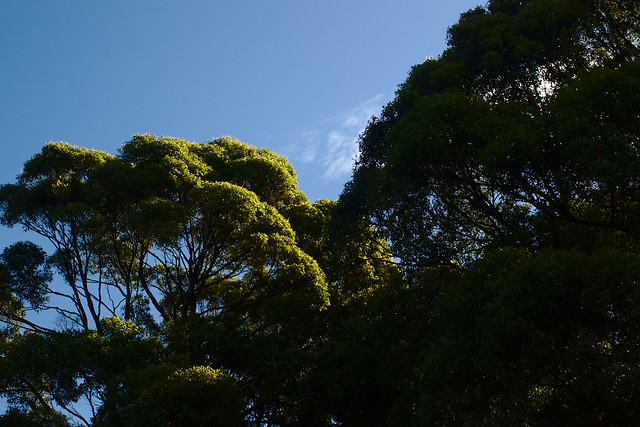
I took Sun in the eucalypts in the late afternoon of Easter Sunday, as the sun was sinking behind the eucalypts at Centennial Park’s children’s bike track. I tried to take one with the sun shining through the trees but didn’t get the lens flare right. I like the contrast between the sunlit tree and the dark tree in this one. It feels springlike, for an autumn scene.
The other three are a very different type of weather shot, taken during Sydney’s extreme rainfall of late April and very early May:
This one has the most post-processing by far: it was originally shot in portrait and in colour. I was messing around with either fast or slow shutter speeds while it poured with rain at my house; I have a number of similar photos where spheres of water are suspended in the air. None of them quite work but I will continue to play with photographing rain with a fast shutter speed. In the meantime, the slow shutter speed here works well. I made the image monochrome in order to make the rain stand out more. In the original image the green tree and the rich brown fencing and brick rather detract from showing exactly how rainy it was.
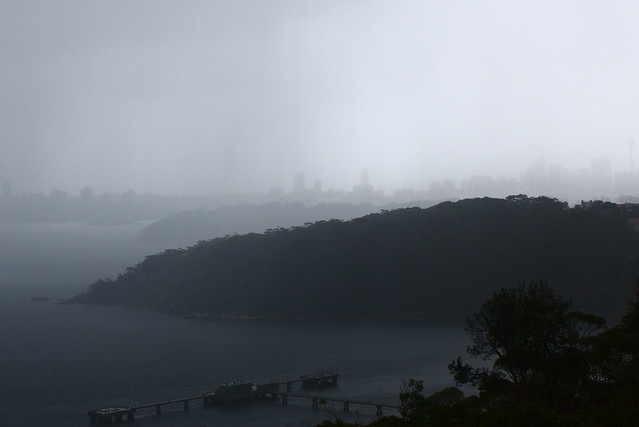
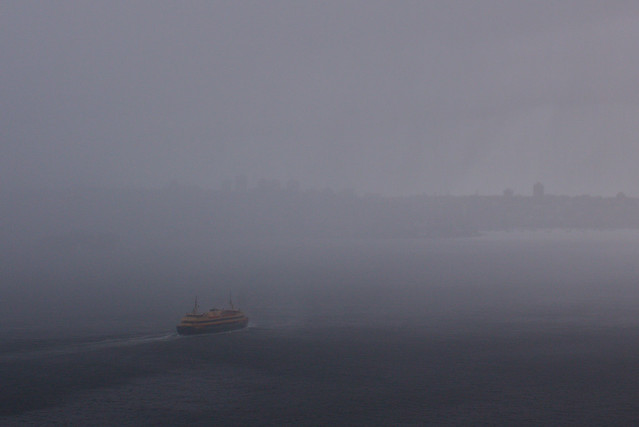
This was shot from Gunners’ Barracks in Mosman (a historical barracks, not an active one) as a sudden rainstorm rolled over Sydney Harbour. The view was good enough, but my lens not wide enough, to see it raining on parts of the harbour and not on other parts. All the obscurity of the city skyline in this shot is due to rain, not fog.
This is the same rainstorm as the above shot; they were taken very close together. It may not be immediately obvious, but the saturation on this shot is close to maximum in order to make the colours of the ferry come up at all. I was the most worried about this shot on the camera, it was very dim. It comes up better in print than on screen, too. The obscurity is again entirely due to the rain, and results in the illusion that there is only one vessel on Sydney Harbour. Even in weather like this, that’s far from true. I felt very lucky to capture this just before the ferry vanished into the rain too.
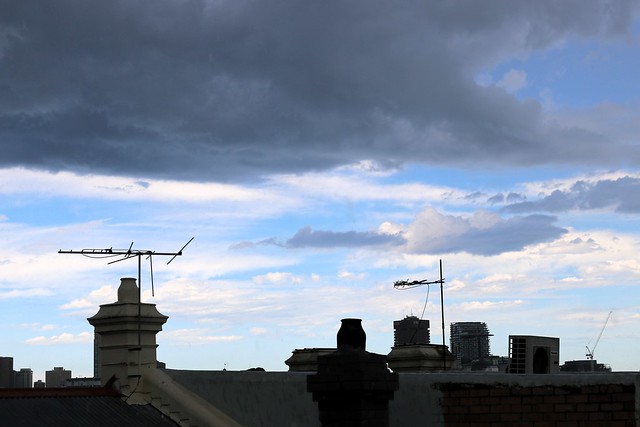
It stormed every day for a few weeks in December, and I kept missing it: either it didn’t hit my suburb or (on more than one occasion) I was taking a nap. But I finally managed to get some photos:
Anyone who has spent Thursday night/Friday in NSW is probably in need of some winter warmers, at least! What’s warming your innards this season? Here are a few recipes of ours, household style (that is, very imprecise measurements).
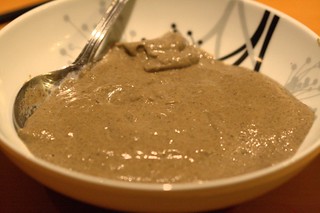
Cream of mushroom soup
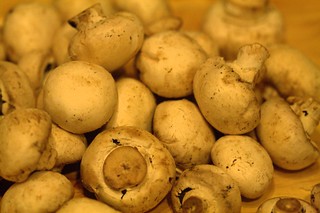
Ingredients: A few handfuls of button mushrooms.
Half an onion.
About 800mL of stock, possibly somewhat more if using a stove top.
About 100mL of cream or sour cream, or some mixture thereof.
NB: I prefer and recommend sour cream but my co-cook despises it, so we tend to make it with cream.
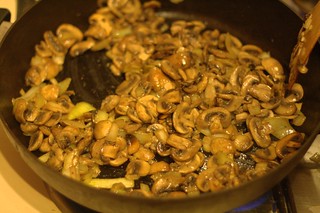
Preparation: Chop up the mushrooms and onions. Fry the mushrooms and onions together. Add the stock and simmer for 5 to 10 minutes. Add the cream and simmer briefly. Pour into a blender and blend until smooth.
Alternative preparation: Chop up the mushrooms and onions. Place in slow cooker with cream and stock on low for 4 hours. Pour into a blender and blend until smooth.
Optional additions: we don’t cook anything much in our house in winter without thyme and bay leaves. Be sure to remove the bay leaf before blending.
Serving suggestion: grind pepper over the result.
Slow cooked chicken drumsticks
Ingredients: An appropriate number of chicken drumsticks.
A 400g tin of diced tomatoes for about every 8 drumsticks.
About 100mL of stock for every drumstick.
A splash of white wine.
As many olives as you think sounds good.
Optional: onion garlic, thyme, bay leaf, etc.
Preparation: roll/dip/immerse the drumsticks in plain flour and briefly brown them in a fry pan (perhaps with onions and garlic). Place them in a slow cooker with all other ingredients and slow cook on high for 4 hours.
Serving suggestion: we serve with couscous.
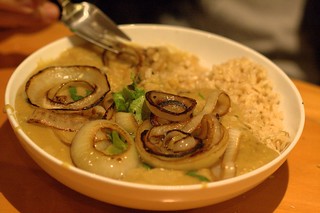
Red lentil daal
For this we follow a recipe pretty closely, namely Stephanie Alexander’s recipe in The Cook’s Companion. It’s very similar to her published recipe in Fairfax’s Cuisine, except we haven’t been using chilli or mustand seeds.
I’ve also tried this in a slow cooker (don’t pre-soak the lentils, have all the pot ingredients in for 8 hours on low) but it ended up being too smooth for my tastes (I have a very strong aversion to some types of very smooth food, namely well-mashed potatoes, ripe avocados, and a few other things, and this daal went into that range).
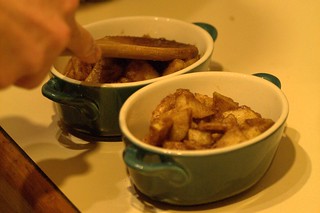
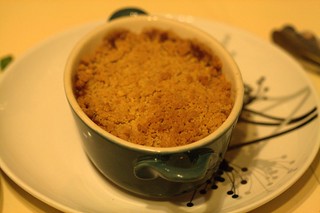
Apple crumble
Another dish where we follow a (simple!) recipe closely, specifically Donna Hay’s recipe for individual portions. We had great luck also, when we had some passionfruit to spare, juicing several of them and mixing the juice with the apple slices for passionfruit crumble.
Let’s recap really quickly: wanting to and being able to use your legal name everywhere is associated with privilege. Non-exhaustive list of reasons you might not want to use it on social networks: everyone knows you by a nickname; you want everyone to know you by a nickname; you’re experimenting with changing some aspect of your identity online before you do it elsewhere; online circles are the only place it’s safe to express some aspect of your identity, ever; your legal name marks you as a member of a group disproportionately targeted for harassment; you want to say things or make connections that you don’t want to share with colleagues, family or bosses; you hate your legal name because it is shared with an abusive family member; your legal name doesn’t match your gender identity; you want to participate in a social network as a fictional character; the mere thought of your stalker seeing even your locked down profile makes you sick; you want to create a special-purpose account; you’re an activist wanting to share information but will be in danger if identified; your legal name is imposed by a legal system that doesn’t match your culture… you know, stuff that only affects a really teeny minority numerically, and only a little bit, you know? (For more on the issue in general, see On refusing to tell you my name and previous posts on this site.)
Anyway, in honour of round one million of forgetting about all of this totally, I bring you anti-pseudonymity bingo! Text version at bottom of post.
In collaboration with Hoydenizens and others, a bingo card for arguments in defence of sexist jokes, specifically, the variants on “but it was FUNNY”.
5x5 sexist joke bingo card
Text version at bottom of post.
Extra suggestions:
the catch-all “it’s just a joke”
“why the fuss? it was one itty bitty teeny weeny joke!”
“you don’t understand my culture at all”
Don’t forget your bingo basics, that is: “One only gets to yell BINGO! if somebody on the internet is advancing an assortment of those arguments simultaneously.” Sometimes, for extra Internet points, you might be able to play (‘ware, porn images) porny presentation bingo or general anti-feminism bingos I and/or II simultaneously.
You can use this bingo card under Creative Commons Zero, that is, public domain (without credit and freely modifiable). Here’s the SVG. There’s a version at the Buzzword Bingo generator that randomises the square placements and uses full sentences, if you are so inclined.
This bingo does assume a male joke-teller, the management acknowledges that it is not only men who tell sexist jokes.
Assuming that you have good reasons for keeping an online diary, there are a few things you can do to improve your chances of making your diary readable. I’ll begin by stating the general principles, and then by reviewing a few breakable rules of thumb that, in my experience, are good indicators of an interesting diary.
The general principle of good writing is to determine your audience, and write for them. An online diarist will normally encounter some tension here — the diarists are often writing partly for themselves or their future selves, and the desire to record events that were important to them may conflict with the desire to record events in an interesting way. You will need to decide to what extent you are intending to resolve this tension in the audience’s favour.
It is the case, if I am part of your audience, that your choice of material is generally meaningless to me, and the use to which you put your material is everything, which is why most of these tips tend towards the stylistic.
Tell a story
Of the beginning, middle and end structure, online diarists struggle most with the ending, often because they don’t know it yet. The most successful stories are often trivial anecdotes. However, there may be an ongoing story that you don’t want to record only in hindsight. In this case, you will want to return to it periodically.
It is very very hard to make a story out of emotions you are still experiencing, unless you’re a brutally honest and particularly insightful person, so if you want to write a powerful emotional entry, you may be better off writing an entry that looks back a year or more.
Write long entries
A long diary entry gives you the chance to tell a story, rather than writing an instant message to your readership, and most good online diaries contain at least the odd long entry scattered in their archives.
Very few online diarists seem to be poets, and so generally very few short entries will not become the highlights of your diary.
Drama is the biggest online diary cliche
If your entry is an allusion to misery that only your three best friends in the world can comprehend, your entry will be boring. The high points of an online diary are very seldom the most dramatic entries, save in the case of diaries that resemble an emotional car crash. For the rest, you will need to hone your ability to make the prosaic interesting, because it is actually much easier to do that than to make secretive drama interesting.
Make your entries complete within themselves
Again, if your entry is full of allusions to events you cannot describe in full, and people you cannot say anything about, and feelings that you are unwilling to share, your entry will be boring. If you need to censor something that is crucial to understanding a story, you may as well censor the entire story. In other cases, tell the story in such a way that it is a complete anecdote, even if it is not totally uncensored. If your reader can tell that you’ve left part of the story out, your entry is not as good as it could be.
A subtle style will serve you well
A diary with a unique voice is often an interesting read. One of the easiest ways to achieve this is to let your spoken style influence your written style. It should be relatively sparing, but a touch of spoken mannerisms in a diary makes it more readable.