Your first fundraiser: your early donors

This entry is part 5 of 9 in the series Your first fundraiser

In 2011, I co-founded the Ada Initiative, a charitable organisation promoting and supporting women in open technology and culture. Between 2011 and 2014, we ran five fundraising drives, four successfully. This article is part of a series sharing what I learned in the hope that new women in technology groups and other activist groups can skip to advanced level fundraising much sooner and spend the least time and the most joy on fundraising that they possibly can.

Pre-drive pledges

In my article on how much to ask for I wrote:

To estimate your donors’ ability to give, it’s time to start asking people for money. Specifically, you need to figure out who is very likely to donate, and begin asking them to pledge to donating once your campaign kicks off. The pledge total will comprise a reasonable fraction of your donation total, somewhere between 10 and 25%. Once you have your pledges in, multiply the total by four. Is that enough to do what you need? No? Then you’re at serious risk of not reaching your goal, and you need to either bring your goal down, or figure out who else to ask for pledges.

Specifically, you’re going to send core supporters and likely large donors a message like this:

Dear [Name],

[1–2 sentences: Express excitement about your organisation and its progress.] [1 sentence: Explain your organisations’s need for money.]

To help us get [organisation] off to a great start, we’re going to be doing a fundraising drive, aiming to raise at least enough for [12 months of salaries? 6 months of rental? 6 months of rental costs? 5 memberships for folks who can’t afford one? 10 scholarships?] and get new people involved at the same time.

We need your help! Can you pledge to giving [$X] during our upcoming fundraising drive during [month]? Having your support, especially in the campaign’s early days, could make a big difference in the success of the campaign.

Thank you!
[Name]

Key things in this message: it’s short, concrete, and asks for a specific amount towards the goal. Each person sending these will want to write a version in their own voice, possibly also tailored to the recipient.

Who to ask, and will they hate me?

This bit is scary, because it is the first time you are putting your name and your relationships to the service of your fundraising. But this doesn’t require cold-calling or asking people who you know will be annoyed you asked.

Here’s who you’re looking to ask: people who already have expressed excitement about and commitment to your mission, people who are interested in you personally and want to see you succeed, people who can afford donations. This isn’t the time to harass a broke friend who is sceptical about your cause into donating. There’s never a time to harass that friend! It’s also not ethical to ask people who you have other financial power over, eg your dependants and your employees (including the organisation’s own employees). Ask people who can say no to you.

Instead, here’s some people you should consider:

  • yourselves, your board, your other volunteers
  • your members and attendees
  • people in your circles who have expressed enthusiasm about your organisation or mission
  • people in your circles who are supportive of you personally, and want to see you succeed

In later fundraising drives, this set of people will also include some of your previous donors, specifically the ones who gave large amounts, the ones who wrote in asking how they could please help further, and the ones who have since become volunteers.

One thing you may find reassuring: angry replies to requests are exceptionally rare, and in fact so is a polite “no”. There are plenty of people who won’t agree to pledge, and the way you’ll know this is their silence; they simply won’t reply to the request.

Estimating pledge amounts

Since you are asking money from committed and interested people, ask for an amount that is meaningful to them, and that represents a commitment when they reflect on it. Once you’ve run other fundraising drives it would be usually be one of the higher suggested amounts on your donation page, which in turn are suggested because some reasonable proportion of donors have proved to be willing to give that amount.

For a first fundraising drive, you and your board and core volunteers can consider your own donation histories. What amounts do you give to organisations you are particularly interested in and want to see succeed? You can also, as always, avoid originality, and survey the donation webpages of similar organisations and those with similar donor profiles (eg, donors are retirees, donors are wealthy professionals, donors are anticapitalists…) and look at their suggested donation amounts. You’ve probably made it onto a few organisation’s mailout lists, how much do they try and solicit from you as a year-end gift? These amounts are around about the right size.

It’s quite common for people to ask if they can pledge a smaller amount than you asked for. Of course you should agree to this.

Other things to ask for

If any of the pledges come in and offer additional help, take it! Depending on who is offering, you could:

  • ask them to volunteer for fundraising: either to join your core fundraising team, or to spread the word on social media, in their workplace, amongst their online community and so on
  • ask them to appear in your marketing: eg ask if you can interview them your website or quote them on your social media about their reason for donating, or if you can use their photograph on your donation website
  • ask them to volunteer their pledge as a matching donor, as in “if you donate during the next 48 hours of the campaign, Mary will match your donation dollar for dollar!”

You probably don’t have the capacity during planning your first fundraiser to also be recruiting and training non-fundraising staff and volunteers for your board or your projects, but if you think your pledged donor would be a better fit for that, you can of course make sure to follow up with them after the drive.

Follow up pledges!

Build a basic tracking list, eg a spreadsheet. Enter in:

  • The potential donor’s name
  • The reason you believe they may pledge
  • The relationship they have with your organisation and who should ask them
  • How much you’re asking for
  • Whether you’ve heard back, what their final pledge amount is, and whether they’ve donated it yet
  • Any complete opt-outs you get (“no, and never ask again”), so that you don’t ask them for future drives

Since silence is a ‘no’, you shouldn’t follow up with people who didn’t respond to your original ask. However, those who did reply and agree to pledge should get two or three followups.

First, contact your agreed pledges first thing after the launch of your campaign (or during any soft launch you do), with a specific message that the best way to help is to donate as early in the campaign as possible and share their participation. A sizeable proportion will enthusiastically do so and let you demonstrate to other donors that there’s a community that has faith in you.

For the others, you’ll want to remind them a couple of times; around halfway through your drive, and shortly before its close. Stay friendly; these are people who have some faith in you, and even if they do not fulfil their pledge they may contribute at some other time. But it’s perfectly fine to follow up along the lines of “you pledged $X to our campaign. If we’ve missed your donation please let us know, otherwise, we’d love it if you donated $X at [site] so that we can [reach our fundraising goal/work on our mission]. Thank you for your support!”

Usually more than 90% of your pledges will be paid, and as per the previous article on setting your goals, they will make up up to 25% of your fundraising total. And they will contribute immeasurably to your belief that your fundraiser and your organisation can succeed!

Matching campaigns

Extremely large pledges are best converted into matching campaigns; the “you give $1 and [person] gives $1” style of campaign. These are usually more time limited than your campaign as a whole, perhaps 3–5 days. Announce big matching challenges in the last two weeks of your campaign to encourage the least committed donors.

Be careful to make the matching total achievable; it should be a stretchy but not unrealistic goal for that time period. Donors won’t act on “help us reach our $250,000 match pledge” if you’ve only raised $10,000 to that point. As a guide, you probably don’t want to announce a matching pledge that exceeds half your total raised to that point. In addition, people should always be encouraged to give immediately. Don’t announce something like “a big donation reward/matching campaign is being announced Friday! look out for it!” or people who were intending to donate will wait until Friday and some of them will forget to come back. Plus you’ll be worried because suddenly your donations have dried up.

Your matching donor should be willing to work with you to promote their matching offer to their own community. You should actively help them: offer them a them a hand preparing or reviewing draft blog entries and social media about their offer. Seek their advice about your outreach during their matching campaign. Check in with them daily during the period of their match offer, letting them know how close they’re getting to their total, how people are hearing about the match and (where you have permission) who donated. Treat your matching donor as the committed fundraising partner they are.

Creative Commons License
Your first fundraiser: your early donors by Mary Gardiner is licensed under a Creative Commons Attribution-ShareAlike 4.0 International License.

Your first fundraiser: how long for, when, and how much?

This entry is part 4 of 9 in the series Your first fundraiser

In 2011, I co-founded the Ada Initiative, a charitable organisation promoting and supporting women in open technology and culture. Between 2011 and 2014, we ran five fundraising drives, four successfully. This article is part of a series sharing what I learned in the hope that new women in technology groups and other activist groups can skip to advanced level fundraising much sooner and spend the least time and the most joy on fundraising that they possibly can.

How long for?

Aim for a campaign length of 3½–4½ weeks, beginning on a Monday and ending on a Wednesday. The Ada Initiative donors told us that they often donated after seeing around three calls to donate from different sources; if your fundraising drive is much shorter than three weeks there’s not time for people to see two or three people telling them to donate, and beyond that and you’re just tiring all the volunteers out and making onlookers wonder when they’ll finally stop hearing about this. Expect almost all donations to come in on weekdays and most between Mondays and Wednesdays; hence a Monday launch and Wednesday conclusion.

Try to straddle a month boundary, ideally finishing the campaign in the first or second week of a month. Some of your donors will need to wait on their payday to donate, particularly if you are asking for donations of significant size, and many people are paid towards the end of a month. Starting on the 1st and concluding on, say, the 25th would miss these donors.

When?

This series is aimed at organisations running their first fundraiser, and the best answer to when is as soon as you can because you need the money to achieve significant goals. Don’t hold off your fundraiser for months trying for the magic right month to run it in.

As a caution: it’s best to just launch a fundraiser, and not announce the dates publicly to donors in advance. There’s two reasons for this: it’s quite likely that your dates will slip (the Ada Initiative’s major slips involved being rejected from Kickstarter on one occasion, and needing to fix payment processing issues on two other occasions); and, as discussed later in the series, you should never encourage people to wait until later to donate, unless you are willing and able to personally follow up with them, because short of personal followup they won’t not come back to do so.

That said, for future fundraisers, when you have time to plan a little more in advance, the conventional wisdom that was passed onto us was, in the United States, to hold fundraising drives very close to the end of the calendar year. In the US, the tax year ends on December 31 and so the time when people want to maximise their tax deductions coincides with the lead-up to Christmas when observers of the holiday are focussed on giving and the pleasure of giving. In Australia, where our tax year finishes on June 30, and Christmas coincides with expensive summer holidays, I am less clear on whether there’s a single best time to run a fundraising drive. A time of year that’s reasonably predictable for your regular donors will be useful; the Ada Initiative settled on the September/October period and had good success despite conventional wisdom around delaying until November/December.

We were also advised that it’s considerably harder to raise money in the US in a presidential election year, as many people direct their donation budget to candidates for office. While it’s not possible to skip fundraising every fourth year, it’s worth having a look around you and try and avoid overlapping with any shorter predictable major political events.

On the other hand, if your donors come from a group that has a significant source of money at a certain time of the year (eg, they work for an industry that pays bonuses at the end of the year), that is a good time to aim for!

How much?

This is where your needs meet your donors’ ability to give. For needs, you should prepare a budget. The details of budgeting are out of scope for this series, but remember: don’t be original! You can look up the budgets of similarly sized organisations in their sponsorship prospectuses, their tax filings (eg, the US 990 tax filing for charitable organisations), and many business and non-profit resource websites. For the Ada Initiative staff salaries were the major expense, as is usual for service organisations. As a very loose guide for small service businesses that are paying staff, your total expenses often come out around twice your staff’s salaries. However for volunteer organisations, or organisations that are going to make extensive grants or do development, salaries will be a much smaller part of your budget and other expenses will loom larger.

To estimate your donors’ ability to give, it’s time to start asking people for money. Specifically, you need to figure out who is very likely to donate, and begin asking them to pledge to donating once your campaign kicks off. The pledge total will comprise a reasonable fraction of your donation total, somewhere between 10 and 25%. Once you have your pledges in, multiply the total by four. Is that enough to do what you need? No? Then you’re at serious risk of not reaching your goal, and you need to either bring your goal down, or figure out who else to ask for pledges.

Building a prospect list and asking for pledges is covered in my next article!

Creative Commons License
Your first fundraiser: how long for, when, and how much? by Mary Gardiner is licensed under a Creative Commons Attribution-ShareAlike 4.0 International License.
Your first fundraiser: don’t be original!

This entry is part 3 of 9 in the series Your first fundraiser

In 2011, I co-founded the Ada Initiative, a charitable organisation promoting and supporting women in open technology and culture. Between 2011 and 2014, we ran five fundraising drives, four successfully. This article is part of a series sharing what I learned in the hope that new women in technology groups and other activist groups can skip to advanced level fundraising much sooner and spend the least time and the most joy on fundraising that they possibly can.

Learn from others

I’m an ex-postgraduate student and I know that hackers and academics are accustomed to not feeling that we’re working hard enough, or even behaving ethically, unless we either do something entirely novel, or at least learn everything from first principles. In business and fundraising, that’s not true. Save your originality for your projects and your approach to your mission.

Instead of trying to do original, innovative fundraising, look for best practices and copy them. Search for successful fundraisers and don’t be afraid to mimic their timeline, reward structure, and total goals closely. Eg, if you are launching a feminist hackerspace, you could look at what Double Union and Seattle Attic did for fundraising goals, rewards, and stretch goals, and learn from them in designing your own campaign. If you’re raising money through sponsorship, get hold of other sponsorship prospectuses and learn how they’re formatted, what their usual contents are, and what level of sponsorship is required for each sponsorship benefit.

And of course, also ask the founders/fundraisers of organisations similar to yours which bits of their fundraiser didn’t work for them.

Beyond that, there’s professional advice. At the Ada Initiative, our fundraising strategy was informed by working with four experienced fundraisers with different styles and insights; one for each of the four successful drives, in fact. If your goal is to raise enough money to pay staff (or your fundraising needs are otherwise $50k+), I strongly recommend you engage a fundraising consultant. Here’s some things to look for:

  • investment/alignment with your mission; perhaps not a close enough match to be an advisor or a board member, but the prospective consultant should be pleased with your mission and your major programs and interested in learning more about them
  • alignment with your core fundraising ethics (eg, at the Ada Initiative we didn’t work with consultants who bought or sold donor contact databases)
  • experience with online campaigns, eg, writing or editing blog posts, social media experience, experience with Kickstarter/Indiegogo/etc
  • experience with donors similar to yours (at the Ada Initiative we worked mostly with consultants who had experience raising money from tech workers)

Some of the things you could discuss with a fundraising consultant:

  • basic best practices they advise everyone on (eg, time of year to raise funds, weekdays to make major announcements on, the kind of thing I’m going through in this series)
  • doing donor outreach before doing any fundraising, such as phone calls to former/likely donors checking in on how they feel about the organisation (donors may feel more comfortable being critical of the organisation to a consultant than they would be to a founder, and the consultant will be able to hear the criticism non-defensively too)
  • doing, or subcontracting, or instructing your staff on, the detail work of the fundraising, such as writing copy, staffing social media, recruiting matching donors
  • choice of platform, eg, which crowdfunding site to use, which payment processor to use, which CRM to use, donation page UX (although these are rarer skillsets than fundraising best practices)

Organisations similar to yours are the best source of recommendations for fundraising consultants. It’s also something a good board may have advice on.

A good board are themselves invaluable. At different times we got key advice from both board members who were fundraising experts and board members who had run other kinds of businesses. Seek out board members, committee members, or informal advisors who have successfully raised money in any form in the past. They may not have much time to volunteer to help you with the nuts and bolts, but should be open to a few hour-long advice giving and war story exchanging conversations before and during your campaign.

Many brilliant and hard-working people have run fundraisers before you, and fundraising norms are generally well-established. Look for what works, and use it to get your organisation off to the best possible start.

Creative Commons License
Your first fundraiser: don’t be original! by Mary Gardiner is licensed under a Creative Commons Attribution-ShareAlike 4.0 International License.
Your first fundraiser: why fundraise?

This entry is part 2 of 9 in the series Your first fundraiser

In 2011, I co-founded the Ada Initiative, a charitable organisation promoting and supporting women in open technology and culture. Between 2011 and 2014, we ran five fundraising drives, four successfully. This article is part of a series sharing what I learned in the hope that new women in technology groups and other activist groups can skip to advanced level fundraising much sooner and spend the least time and the most joy on fundraising that they possibly can.

Why you should have a fundraising drive

In 2014, in the Ada Initiative’s article on choosing a funding model we wrote:

Often activists will reach for every funding opportunity they can: individual fundraising campaign, yes! Government grants, yes! Selling stickers, yes! Sucking up to wealthy potential donors at lavish one-on-one dinners, absolutely! But it is crucial to pick just two or three funding sources and concentrate on them.

Raising money in any form takes time, practice, dedication, and skill. Pursuing too many forms of funding will just mean that you’re bad at all of them. Some diversification of funding sources is often recommended, but the base requirement is a reliable funding source[…]

Since mid-2011, the bedrock of the Ada Initiative’s funding has come from a few hundred individuals within the technology community. Being accountable to donors who are primarily interested in culture change even when it has no direct benefit to themselves allows us to take on more radical programs. This includes work that is not directly connected with hiring or careers, or that is connected with gift and alternative economies like media fandom with little direct connection to corporate profits.

Perhaps the most compelling reason to adopt an individual donor funding model is that donors often become advocates for diversity in tech themselves…

These are great arguments for individual fundraising. Another one is that individual donors are often the most willing to take a risk on a new, untested, project; corporate donors/sponsors are more conservative and often want to see at least an informal track record to figure out what they’re associating their brand with.

If you’ve chosen individual fundraising for these or other reasons, the next question is: why do a drive as opposed to popping a donation form or Paypal donate button on your website and waiting for donations?

The first reason is simple: a drive will earn a lot more money. The Ada Initiative was a reasonably well known organisation with a reasonable amount of web traffic, but spontaneous donations outside a drive were at the rate of one or two donations a month. Our last few fundraising drives on the other hand earned hundreds of thousands of dollars and attracted as many donors in a day as we would get in the entire rest of the year. Our experience was that fundraising revenue exceeded spontaneous donation revenue by a hundred times.

There’s a tempting line of thinking around passive fundraising — I’m prone to it — which is that if your mission was truly great and your approach to it truly excellent, then the world would discover it spontaneously. Asking for money would then prove the inferiority of your mission or your organisation. Here’s a counter-argument: in order to be successful, you need to be the most invested person. If you aren’t committed to your mission, your donors won’t trust you to fufil it. Taking a risk by openly asking for money, explaining why you need it and what you’ll do with it, is one of the best ways to convince your potential donors that you have a chance at doing what needs to be done.

As we wrote in 2014, a good fundraising drive has a complementary goal: raising awareness of your organisation, and getting people involved. There’s at least two possibilities here. If you’re raising funds from the same community you’re going to benefit, your launch donors are likely to be among your key volunteers or members shortly thereafter. If you’re raising money from a different community from the one you’re going to benefit, your launch donors will be key in reaching other donors, and developing your fundraising strategy in future.

In designing your fundraising campaign, you will raise the money you need, and building a community of members and volunteers, or ongoing donors, at the same time. Good fundraising is hard work, but it isn’t a tiresome distraction from your mission. It’s how you will build the community you need to fulfil your mission.

Creative Commons License
Your first fundraiser: why fundraise? by Mary Gardiner is licensed under a Creative Commons Attribution-ShareAlike 4.0 International License.
Based on a work at https://adainitiative.org/2014/06/10/the-ada-initiative-founders-on-funding-activism-for-women-in-open-source-from-model-view-culture/.

Your first fundraiser: what the Ada Initiative learned the hard way

This entry is part 1 of 9 in the series Your first fundraiser

In 2011, I co-founded the Ada Initiative, a charitable organisation promoting and supporting women in open technology and culture. Between 2011 and 2014, we ran five fundraising drives, four successfully.

We made a bunch of bad decisions along the way. For example, after our first drive in 2011, we stopped accepting donations, and moreover assumed that folks who had been denied the opportunity to donate in mid-2011 would still be there and keen in early 2012 (spoiler: no they weren’t). We offered t-shirts as a donor thank you gift. Worse: we offered t-shirts twice.

We also got a lot of excellent advice from fundraising experts and from our fabulous boards of directors, and through a combination of hard work (both ourselves and our volunteers!), good ideas, and good luck, had a lot of success. For several years I’ve been informally advising other women in technology groups on fundraising for the first time ever,

Over the next several weeks, I’m publishing a series of articles with my fundraising wisdom, with the hope that new women in technology groups and other activist groups can skip to advanced level fundraising much sooner. May you spend the least time and the most joy on fundraising that you possibly can!

Creative Commons License
Your first fundraiser: what the Ada Initiative learned the hard way by Mary Gardiner is licensed under a Creative Commons Attribution-ShareAlike 4.0 International License.
If you’re still maintaining a LiveJournal, your journal’s now in Russia

Signal-boosting this news as I know a few people still maintaining a LiveJournal who might choose to delete it, or change their use of LiveJournal after learning about this.

LiveJournal is now hosted in Russia

As of late December 2016, the LiveJournal servers (computers) are now hosted in Russia. While LiveJournal has been owned by Russian company SUP since 2007, the servers had until now been hosted in the US and access to them somewhat controlled by Californian law.

SUP has, to the best of my knowledge, not announced or commented on this themselves, but there’s more information at rahirah’s Dreamwidth journal with links to different evidence of the new location of the servers.

A Russian-language LiveJournaller appears to report that Russian law then allows that all the confidential information of [LiveJournal] users is available for [Russian] domestic security services in real time [note though that that’s a automated translation].

A BBC report on Russian law regarding social media in 2014 seems to confirm this:

A new law imposing restrictions on users of social media has come into effect in Russia.

It means bloggers with more than 3,000 daily readers must register with the mass media regulator, Roskomnadzor, and conform to the regulations that govern the country’s larger media outlets.

Internet companies will also be required to allow Russian authorities access to users’ information.

Thanks to my original source of information about this (found via @anatsuno on Twitter).

siderea expresses several important concerns with this:

  1. if you’re in Russia or vulnerable to Russia, and a political opponent, you could now be more easily identified by Russian security
  2. regardless of where you are, your LiveJournal could be possibly be deleted without notice for expressing opposition to Russia or its interests or for other content censored in Russia (eg LGBT-related content)
  3. the flight of LiveJournal users from LiveJournal following this news could simply kill the business and cause everyone’s journals to disappear without notice (Archive Team is storing public entries, regarding it as an at-risk site)

Readers’ connections to LiveJournal aren’t private

LiveJournal redirects secure https links back to insecure http. For example, if you visit https://ohnotheydidnt.livejournal.com/ your browser will connect, but it will be instructed to head to http://ohnotheydidnt.livejournal.com/ before loading the page. (Info from this Dreamwidth comment by mme_hardy, confirming my personal experiences with LiveJournal RSS feeds over the last several months.)

What this means is that the content of any entries you read, including locked ones by both you and other people, are trivially visible to anyone who can eavesdrop on your net connection, including (often) other people on your local network, and anyone on the path between you and LiveJournal such as your ISP and anyone with access to the data flowing across international cables or access to the data as it enters the Russian hosting facility, whereas https connections are encrypted in a way such that those people can see that data is flowing but can’t read it absent considerably more niche and intensive technical measures. (Even if HTTPS were turned on by LiveJournal, you wouldn’t be safe from the Russian law, since they can ask LiveJournal itself to turn over your data in addition to whatever nation-state attacker level techniques they can employ.)

Given my experience with LiveJournal RSS feeds, I’m fairly sure this has been true for some time, predating the move of the servers to Russia. (Here’s one other report that this was already true as of September 2016.) Regardless of timing, this speaks of, at best, disregard for the privacy of their users’ explicitly private (because friends-locked!) information. It’s 2017, mandatory HTTPS for transmission of any data that is sensitive or might, conceivably, somehow, maybe, be sensitive is an absolute minimum standard for user safety. LiveJournal doesn’t even have optional “if you have HTTPS Everywhere installed” or “if you remember to stick the s into the URL yourself” HTTPS (which would still be insufficient as you cannot control whether your readers use HTTPS when reading your journal).

Getting your content out of LiveJournal

If based on this you choose to delete your LiveJournal, here are some options to keep your entries. This list isn’t comprehensive.

If you want to move the content to another website, here’s some blogging platforms that provide imports from LiveJournal:

If you want to download your entries for private use, you can:

  • use LiveJournal’s own export tool but rather painfully (you’ll have to do one download per month), and without comments
  • use ljdump on the command line, which worked for me as of 2015 when I deleted my LiveJournal, but will require that you’re an experienced command line user
  • use BlogBooker to export it to a Word or PDF file (disclosure: I haven’t used this site in quite some time, and would appreciate hearing if it works, but I suggest people at least try it because it exports to a non-programmer friendly format that people could keep as a private archive, and claims to include comments and images)
  • Archive Team lists other backup tools

If your LiveJournal made use of their photo hosting, I am not sure which backup solutions will import your photos or how they will be stored. I am also not aware of any import tool that replaces LiveJournal entries with a “this entry has moved to URL” message or similar. If anyone is working on a competing LiveJournal import/export tool, photo export and redirection text are both features that my friends and I would have found useful at various times.

Creative Commons License
If you’re still maintaining a LiveJournal, your journal’s now in Russia by Mary Gardiner is licensed under a Creative Commons Attribution-ShareAlike 4.0 International License.
Superhumanised methyl: an infallible process for naming things

“I’m no good at names” said pretty much everyone I’ve ever founded and named a project with. Of course you aren’t because how often does one found and name a project? It’s a learned skill. You’ll get better at naming things as you name more things.

I’ve been following the same naming process since we named the Ada Initiative and it’s worked well several times; we came up with a name that we liked and the project didn’t split up over the issue of naming. I thus feel like it’s ready for public release and declaration of infallibility.

What are you trying to name?

Get down a short description of the thing you are trying to name: a two sentence summary, a mission statement, or similar. Eg: “a group blog for people who both knit and crochet”, “a future multinational oil company” or “a street festival”.

This may sound really obvious — why would you be naming something before you know what it is? — but in fact often you have to name things before almost anything else happens, because the name will need to go in your domain, in your incorporation paperwork, in your Twitter handle and so on. Often the need for a name arrives simultaneously with the need for a mission statement; get a short summary down as you currently understand your project.

Consider the obvious

I tend to lean to names that are fairly abstract, because I want to avoid asserting a particular kind of authority for a new project. For example, the Ada Initiative was not named “the Women in Open Source Initiative” for the reason that we weren’t intending to be an umbrella group or a one-stop-shop. Separately, abstract names are apparently easier to establish as a trademark (of course, if trademarkability is an important consideration for you, involve an intellectual property lawyer in your naming process).

But that said, it’s worth considering if you should be “the Winter Street Fair” or “the Crafters Blog” or “Oil, Incorporated” before you disappear into the web of name possibilities.

Assuming you’ve decided not to go with a descriptive name, it’s time to…

Come up with sources of metaphors

This is the part where I personally get stuck on “but I’m terrible at coming up with metaphors”. But again, you don’t have to do this cold. Think about:

  • your field: tools and technologies, sources of meaning and difference and status within it (quality, skill, design, distinctiveness, price, reliability, longevity, sub-cultural elements…)
  • history: early figures in the field/region, early tools and technologies, important places and their names
  • related fields and their tools and technologies, important places and so on
  • natural phenomena are very established metaphors: weather for energy/change, fire for destruction/renewal, wilderness (and space) for adventurousness, water for soothing/endurance/relentlessness

Your craft blog: historical crafters, historical technologies (eg the names of early looms), current technologies, colours, stitches, patterns, garments.

Your street festival: historical residents of the area, earlier names for the locality, street names, seasons and weather, local wares.

Your oil company: earth, power… varieties of hats? Pollution? Seriously, don’t get me to name your oil company.

Quite a lot of fields have a well-established metaphor, eg, “cloud” for computer servers hosted by other people (and earlier, for the wider Internet in general, often depicted as a cloud in diagrams). Add this and related metaphors to your sources of metaphor.

Create a list of possible names or part names.

Now you have your sources of metaphor, use them to come up with specific possible names. This is brainstorming with reference materials. I use either a thesaurus or Wikipedia to get down as many ideas as possible.

Valerie wanted to name the Ada Initiative for Ada Lovelace, but the second part of the name came from thinking about wanting to capture, essentially, activity, and then following networks of words related to activity, forward motion, and change around a thesaurus. I’ve named other things by working my way through Wikipedia categories and lists.

If I was naming a provider of cloud computing services and wanted to stick close to the cloud metaphor, this is some of what I’d end up with from this process:

  • from thesauruses, based on “cloud”: steam, vapour, nebula, dapple(d), overcast
  • from Wikipedia, poking around cloud and weather categories: hector, cloudburst, flanking line, cumulus, stratus, mushroom

If I was going to be going for high reliability, I might go with ground/grounded as a metaphor instead, and some of the following might end up on the list:

  • from thesauruses, based on “earth”: clay, loam, pottery, cave, nest, field, holding, home, soil, tillage
  • from Wikipedia, looking around soil-related categories: brown earth, mire, loam, terra, peat

This is the long-listing phase: Put down every possible name that you vaguely like. Don’t be bound by your sources of metaphor, consider adding words you’ve always liked or cool words you find randomly flipping in a dictionary, fragments of your personal motto, abandoned names from previous projects. There’s already a ton of filtering going on here (eg, it turns out there’s a whole lot of trademarked soil products ending in -sol I didn’t include) but don’t do it systematically yet. Just avoid writing down stuff you hate.

If I was looking for/open to a two word phrase, I’d both allow them here (“red soil”) and do the same process for the second half of a name (“initiative”).

You can cautiously branch out into other languages. I tend to end up at Latin pretty quickly because there’s less cultural appropriation issues than with many living languages, and English speakers can usually figure out a plausible pronunciation of the name.

Whittle down the list.

It’s time for the short-listing phase. You can do this by gut: get rid of “meh” names. This is also a good time to add a bunch of practical constraints to help cut it down. For example:

  • does it have connotations you don’t intend? (eg “girls” for a women’s group will at some point cause people to start asking questions about the age range of members)
  • how formal is the name, compared with your intentions?
  • is it striking and memorable?
  • is the origin story of the name entertaining and OK to share? (you may be asked for it)
  • is an appropriate domain name/Twitter handle/your landgrab here available?
  • is it easy to spell? (joke is on me: it took me ages to learn to type “initiative” reliably)
  • will people understand it when you say it over the phone? (trick question, this is never true, barring naming your new project “John” — or wait, was that “Jon”? — but if you keep it short at least spelling it out won’t be time consuming)
  • do you like the acronym or short form? does it have its own spelling or confusion issues? (the Ada Initiative used to receive a fair bit of correspondence concerning the Americans with Disabilities Act and the American Diabetes Association, both known as ADA)
  • is there a similar trademark?
  • is it a “style” of name widespread in your market (eg, two word names are common, or single syllables are common, or naming things in memory of is common) and do you want to nod to that or depart from it?
  • is it a word in other languages, and if so, what does it mean?
  • are you borrowing a term from a dispossessed or disadvantaged group? (eg using an Indigenous word for a non-Indigenous-centered thing in Australia)

The specific constraints will vary: I’ve rarely had to care about trademarks so far, and the fewer things I have to spell out over the phone the better. You’ll probably refine your criteria as you strike individual names.

Often at the end of this process you’ll be down to five names or less. One catch: you are pretty tired and bored by this point. Be sure you get rid of any name you in fact hate, no matter how good it seems by your criteria, because otherwise you risk choosing it out of exhaustion or inertia. In a group setting, you will need to risk a bit of conflict by trying to draw out “does anyone actually just hate any of these?”

The last one

Sometimes if you are lucky, you only have one candidate left, or else one that is just the best by far. You have a winner!

Otherwise, this is tricky. You’ve looked at the names so long you’ve started to lose any sense of their goodness. However, the whole painful preceeding process means that something that has made it this far is likely to be a perfectly fine name that you will grow attached to over time. Possibilities for making the final decision include: allowing no-reason vetos, votes, tasking one person with making the call. It can be worth taking an hour or two imagining the name in use: on your posters, your business card, your graffiti.

Postscript: what’s up with “superhumanised methyl”? Super? Human? Ised? Methyl? Well, I knew I needed to perform flawlessly in naming this entry, and so I did not do any of the above process but instead ran my random word generator a bunch of times until I got something I vaguely liked. However, in the spirit of full disclosure: I did change it to Commonwealth spelling.

Creative Commons License
Superhumanised methyl: an infallible process for naming things by Mary Gardiner is licensed under a Creative Commons Attribution-ShareAlike 4.0 International License.
Learning more about a remote working position

This entry is part 1 of 3 in the series Remote work

I’m in the process of wrapping up a long period of working remotely at least part-time from home, beginning in 2006 when I enrolled in a PhD program and continuing through my time at the Ada Initiative and at Stripe to this year.

My take on working remotely in future is really “it depends on the details” (and likely different details for different organizations). To that end, I contributed some suggested questions you could ask to Hypothesis’s Working remotely guide, which they’ve incorporated in a slightly edited form. Here’s my original questions; I’ve also added a few more at my end after some feedback from Andrew (himself a veteran of around seven years of remote work).

Introduction

Before you start working remotely at a new organization, you should explore how they structure remote working and if there are any expectations mismatches between you and the organization. A particular remote job may or may not be a match for a particular remote worker.

Important: I don’t think there is any one right answer to any of these questions. It’s a question of fit between your working style, the position itself, and the relationship of the position to the rest of the organization. But the answers are worth knowing so that you can evaluate your fit and make plans for effective remote working.

Sources of information

This entry has a lot of questions, too many for a “do you have any questions?” section of an interview. But you can use other sources of information to get most answers, especially about organization-wide questions:

  • the job description, and descriptions of similar roles
  • the organization’s website, particularly the About and Careers pages
  • the section of the employee handbook dealing with remote work
  • the LinkedIn pages or websites of your future manager and colleagues
  • longer, separate, conversations with your recruiter or hiring manager
  • your offer conversation or letter, or your contract

Some questions you also may only need to ask if you hear of concrete plans to make a change to the organization (eg, you learn that a new office is about to open near you).

Questions

How are you remote and who are you remote from? This post is using ‘remote’ to mean something like “most days, you are not in face to face contact with any colleagues.” But you should be aware of the details: will you be working without in person contact with teammates or with the wider organization almost all of the time? Do you have any colleagues in your team or your wider organization in your city or region, or who regularly visit? Will you work on any joint projects with them? Will you be able or be expected to sometimes work with them in person even if there’s not a permanent office space?

Separately, is in-person contact with vendors or customers part of the job?

Is your immediate team remote? Is your manager remote? Being a remote member of a team that is all working remotely from each other is different from a team which is mostly located in an office with each other. Likewise, being managed by someone who is in an office has some potential advantages (for example, access to information circulating through verbal grapevines, being able to access answers from colleagues for you quickly), as does being managed by someone who is themselves remote (a direct appreciation for experiences specific to remote workers, a personal interest in advocating for them).

How many remote workers are there at the rest of the organization? What percentage of teams you will work closely with are working remotely, and what percentage of employees overall are working remotely? Working as one of very few remote workers for an organization where most employees are in an office together is different from a mostly or entirely remote-working organization.

What’s the future of remote work at the organization? If the organization is mostly or entirely remote, are there any plans to change that? If the organization is mostly office-based, are there any plans to change that? If an office is likely to be founded in your city or region soon, will you be able or be expected to work from it?

You may be considering a job on the understanding that the remote work will be of very short duration (eg, an office is opening in your city in two months time). Is there any chance the time will be longer, and are you OK with that?

What is your manager’s approach to remote workers? How frequently will they speak with you and through what media? Will they expect you to travel to them? Will they sometimes travel to you? Have they managed remote workers before?

How long have there been remote workers for? Is the organization new to having remote workers or has it had remote workers for a long time and bedded down a remote working style?

What is the remote working culture like? Is most collaboration over email, text chat, phone, video conf, or some other means? Are there watercooler-equivalents like social IRC channels or video chats? How active are they? Are remote workers mainly working from home or from co-working spaces? Are there occasional team gatherings for remote workers to meet colleagues in person and are they optional or compulsory?

How flexible are the hours? Not all remote work has flexible hours; you may have mandated work hours, or core hours, or shifts, as in any other role.

Are the remote workers spread across multiple timezones? If so, are your team and closest collagues in your timezone or another one? Are you expected to adapt your working hours to overlap better with your colleagues? How are meetings and other commitments scheduled across timezones? Do they rotate through timezones or are they always held in a certain timezone? Are you ever expected to attend meetings well outside your working hours, and if so, how often is this expected and do your colleagues in other timezones face the same expectations?

What are the benefits for remote workers? Will the organization reimburse any of your remote working expenses, such as membership of a co-working space, home office furniture, or your home Internet connection costs? If you’re working in a different country from most of your colleagues, will you get equivalent benefits to your colleagues (eg, health insurance coverage)?

What are the travel expectations for remote workers? Are you expected to travel to headquarters or other offices or customers, and if so, how often and for how long? What are the travel policies and allowances for remote workers? How do these travel expectations compare to those of non-remote colleagues?

Sometimes you will be remote from an organization with an office or even headquarters in the same city as you. Will you be able or expected to visit the office? How often? Will there be resources for you (eg, hot desks, meal provisioning)?

What are the career progression possibilities for remote workers? As a remote worker in a partly non-remote organization, could you move into more senior positions over time, such as team leader, middle manager, or executive? Could you move into other teams in the organization, and if so, which ones? Are there some roles that are closed to remote workers? Match these answers to your own career goals.

What’s the training process like? Must you or can you spend a period of time in an office or visiting a colleague for training? Must you or can you do your training remotely using documentation, videos and similar? Will a trainer or colleague have some time assigned to remotely train you?

Is there support for first-time remote workers? If you haven’t worked remotely before, will the organization support you in learning how to work remotely, and if so, how?

See also

A very partial list of resources, focussing on individual remote workers and their experiences and strategies:

Creative Commons License
Learning more about a remote working position by Mary Gardiner is licensed under a Creative Commons Attribution-ShareAlike 4.0 International License.
Make your Dreamhost site HTTPS-only

Encrypt all the traffic!

Some of the archival Ada Initiative web content is hosted on Dreamhost, and today I re-enabled HTTPS for it now that Let’s Encrypt certificates are available both on Dreamhost and WordPress.com.

Update October 2017: official Dreamhost documentation on adding an SSL certificate and forcing your site to load securely with an .htaccess file is available.

Here’s how to enable, and insist on, HTTPS connections to sites hosted on Dreamhost:

  1. Log into the panel
  2. Go to Secure Hosting
  3. Click ‘Add Secure Hosting’
  4. Select the domain you want from the dropdown, check the box next to ‘By checking this option you agree to the Let’s Encrypt Terms of Service.’, leave ‘Unique IP’ unchecked, and press ‘Add now’.
  5. Important: wait for an email from Dreamhost telling you the certificate is ready. This seems to take about fifteen minutes or so. The email contains a copy of the certificate but you don’t need to do anything with it, they configure the webserver automatically at about the same time as they send the email.
  6. Once you have received the email, check that your site is available at https://YOUR-URL and that your browswer does not report errors. (If it does, wait around 15 minutes, try again, and if you’re still seeing errors, screenshot them and contact Dreamhost support.)

Now that HTTPS is working on your site, you can then force all HTTP requests to redirect to HTTPS by placing this in the ~/YOUR-URL/.htaccess file:


<IfModule mod_rewrite.c>
# Redirect all insecure requests
RewriteCond %{HTTPS} !=on
RewriteRule ^/?(.*) https://%{SERVER_NAME}/$1 [R=301,L]
</IfModule>

# tell web browsers not to even try HTTP on this domain for the next year
# uncomment this only after you've confirmed your site is working on HTTPS, since it commits you to providing it over HTTPS
# Header set Strict-Transport-Security "max-age=31536000" env=HTTPS

Check that visiting http://YOUR-URL now redirects to https://YOUR-URL, and the same should be true of pages underneath http://YOUR-URL.

Feature request for Dreamhost: make a “force HTTPS” option in your standard config.

For more information on Strict-Transport-Security see HTTP Strict Transport Security for Apache, NGINX and Lighttpd and Stack Overflow: How to set HSTS header from .htaccess only on HTTPS.

Bonus round: update absolute links

If your site is a bunch of static HTML files, and you have done a lot of absolute linking to your own webpages, here’s a possible command you could run, replacing example.com with your own domain. I don’t recommend running it unless you know the UNIX command line, and you have a fairly good idea of what find and sed both do:


DOMAIN=example.com
cp -a ~/$DOMAIN ~/$DOMAIN-backup-before-https-edit
cd ~/$DOMAIN
find -type f -name "*.html" -exec sed -i "s/http:\/\/$DOMAIN/https:\/\/$DOMAIN/g" {} \;

Creative Commons License
Make your Dreamhost site HTTPS-only by Mary Gardiner is licensed under a Creative Commons Attribution-ShareAlike 4.0 International License.
Eye-catching graphics in two minutes: a wordsmith’s guide

Graphics have been spicing up my writing and slidedecks over my fifteen years as a writer and a public speaker; the simpler and more attractive the better. But it’s not easy to put them there.

I’ve had the good fortune to also have been an amateur photographer the whole time, and have taught myself some basic image editing skills, so when I find an image that’s not quite right but could be, I pop it in an image editor, twiddle a reliable and small set of dials, and out emerges something more eye-catching. Lucky me. And lucky you: the tricks to turn a photo into something simpler and more eye-catching are simple, and today is the day I share my version of them.

Are you a wordsmith more than an visual person? Are you a writer or a public speaker who appreciates the power of a strong visual in other people’s pieces and slide decks, and wish you could just twiddle a few dials and make it happen with your own images? Do you want to make featured images for a WordPress theme, or something to break up a millionty paragraphs of text, or a colourful image to re-engage your audience in your talk? Do you sometimes have an idea of what you want but the images your searches dig up are just a bit flat for your purposes? This is for you.

This entry covers two topics: first, finding existing images that you can make work for you without any further editing. Win! And the next level: when you have an idea of what you want, and you have a photo that… doesn’t quite tell that story… but could… it’s time to make some quick and dirty edits to liven it up. Make the colours a little stronger or stranger, eliminate some clutter, and pull out some detail. Your illustrations are complete!

Eye-catching photos for wordsmiths: principles

Eye-catching images accompanying to your writing or speaking should be brain candy: simple subjects that people can identify at a glance; high contrast so that most people can understand what they’re seen quickly; and understand at a glance; and brightly or interestingly coloured because it’s eye-catching and fun. Your illustrations will usually be a subtlety-free zone.

Luckily simple, colourful, and easy to understand is an appealing set of things to have in a photo, so you’ll often be able to find free photos that you can use without editing. But there’s also a very simple set of tools that will let you take an existing photo and up its simplicity and eye-catching for your work. Finding first; then failing that, editing.

Finding images

Use photos that the photographer allows to be used and changed by other people! The Creative Commons system provides photographers and others with a way to give you this right.

To find images with Creative Commons licences that match my needs, I head on over to Flickr search, with Commercial use & mods allowed selected in the “Any licence” drop down. A couple of Flickr search tips:

  • search for generic terms. If you’re looking to make a point about time, first search for “clock” and “watch” and “sundial”, not things like “clock showing noon” or “bedside clock”. Images are often fairly generically labelled by their creator and you miss some good stuff by going specific.
  • use Flickr’s “Interesting” search tool. There’s a dropdown labelled “Relevant” — by default Flickr is trying to find images whose textual description and tags best match your search term. Try changing it to “Interesting”, to instead find somewhat matching images that are very popular on Flickr. This will often bias towards images that are already technically good, highly saturated, have an unusual subject or setting, and similar; exactly the kind of eye-catching things you want for your blog post or slide deck.

Flickr isn’t the only Creative Commons game in town: there’s also Wikimedia Commons or Google Images (after your search, go to “Search tools”, then “Usage rights” then “Labeled for reuse with modification”.

Caution: often images found this way must still be credited to their creator. Learn more here.
Caution: be careful of images with recognisable people in them. The permission you got to use the image was from the photographer, not the subject. Ethically, the person in the photo may not wish to have their likeness appear with your content, and in some cases using images of people may be restricted by personality rights or privacy rights. It’s usually best to skip images of people, or to buy them from a reputable stock image site.

[Update 2019: Tanya Reilly has surveyed more ways of finding freely licenced photos, including sites where all of the photos are Creative Commons Zero/public domain.]

Editing tools

The point of this tutorial is to make adjustments to some of the most common “knobs” you can twiddle on digital images. If you want to start making edits, and you already have a tool in mind, look up how to crop, how to auto adjust levels, how to change saturation, how to change contrast, and how to change brightness in your chosen graphics software.

In this tutorial, I’ve made the edits to images with Pinta, a free and comparatively simple graphics program for Windows, Mac, and Linux. I haven’t used them, but Paint.NET is a widely recommended equivalently straightforward Windows image editor, and Pixelmator seems highly recommended on Mac.

Editing photos to be eyecatching: short version

  1. crop the image so that the subject of interest comprises most of the image, and is off-center
  2. try auto-level colour adjustments
  3. try somewhat increasing one or more of contrast and saturation, perhaps while twiddling brightness up or down
  4. also try decreasing saturation

That’s it! If you want examples of what this looks like in action, read on!

Editing photos to be eyecatching: with examples

Meet our original images

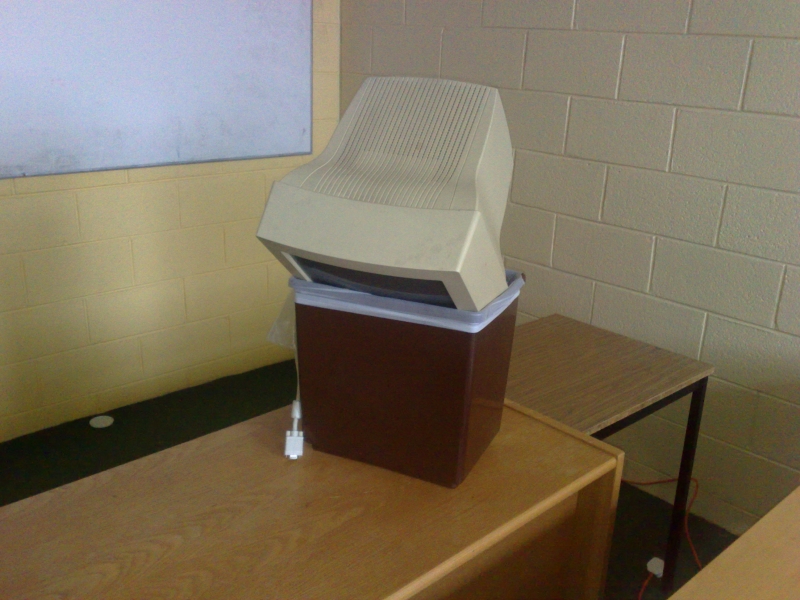
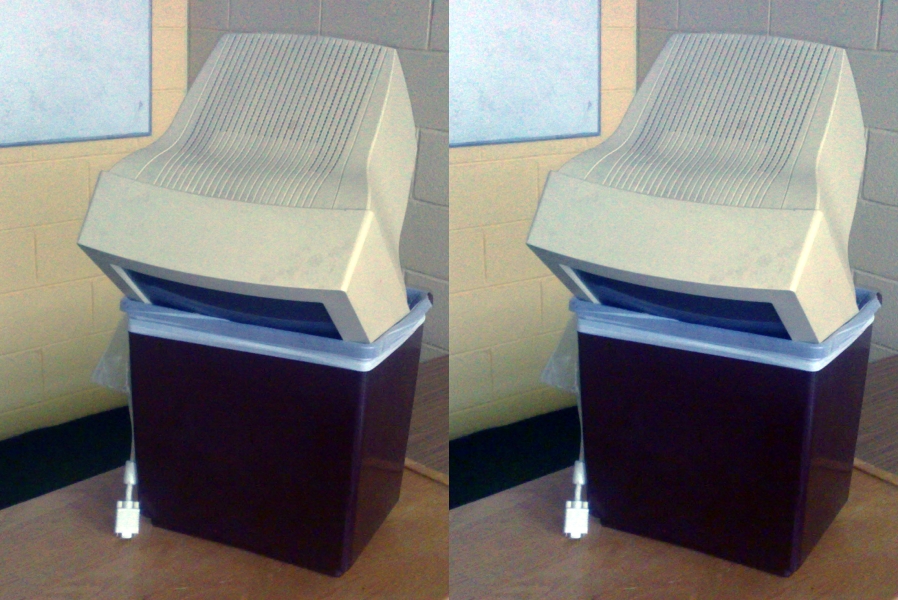
Old Computer by Sean MacEntee. Old Computer is a surprisingly rare beast: a freely licenced photo of a computer that is being discarded. I find it easy to find great photos for search terms like apple or pen, less so for “computer in trash”. It’s a problem when you write complaints about computers a lot.

Old Computer has two major limitations if you wanted it for your condemnation of the tech industry or your rage at discarding electronics into landfill:

  • it’s “flat” colour-wise: there’s a lot of very similar beige-y colours in the image
  • there’s a lot of classroom in the shot and not a lot of computer-in-bin
A computer monitor in a bin
by Sean MacEntee

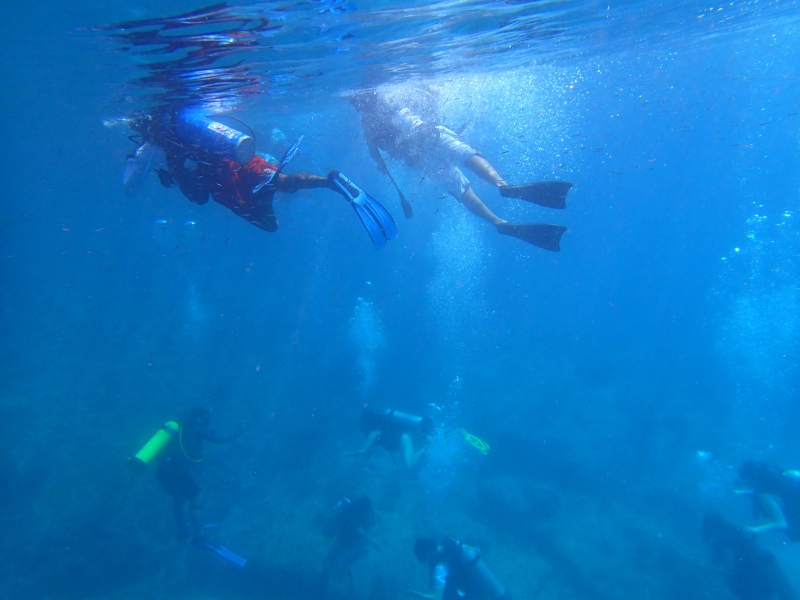
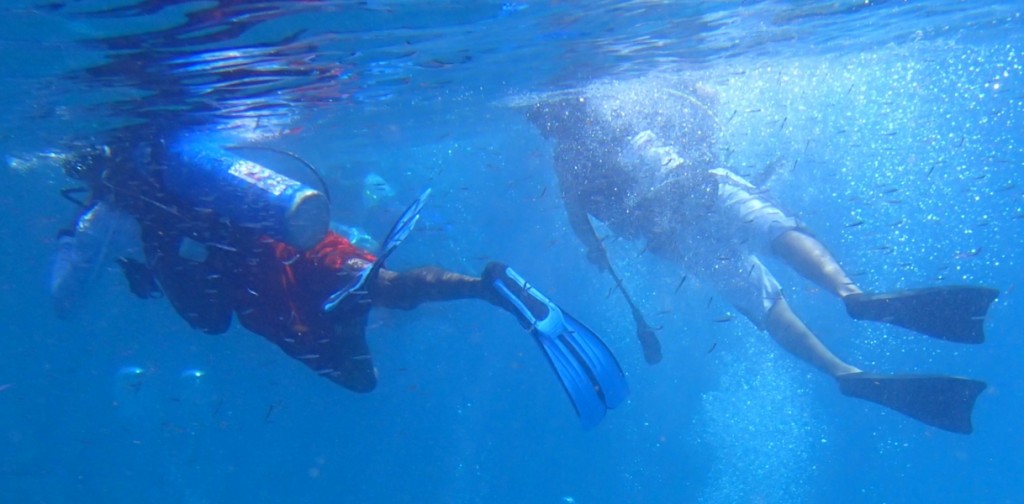
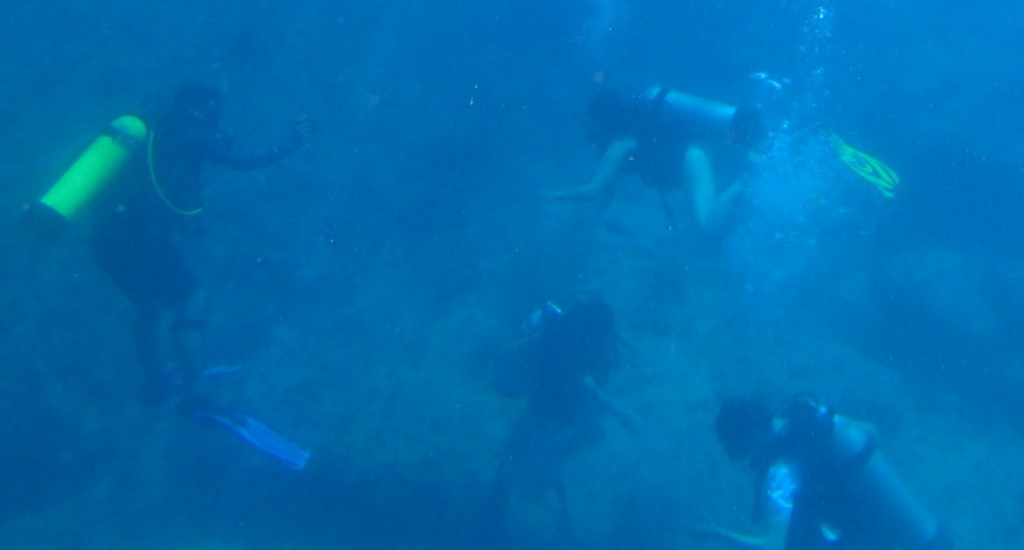
PC270246 by NickDun (hereafter called SCUBA). This is a very evocative shot of what scuba diving in a group is like and would be a great addition to your story of getting your mask kicked off by that so-and-so who probably certified yesterday, but:

  • it’s a very typical shot taken with an underwater camera, that is, it’s extremely blue-tinted
  • there’s a lot going on in it; if you want to talk about sunlight and freedom, or if you want to talk about crowds of divers, you may only want to illustrate your post with part of the image
Two divers snorkelling above a large crowd of divers
by NickDun CC BY-SA

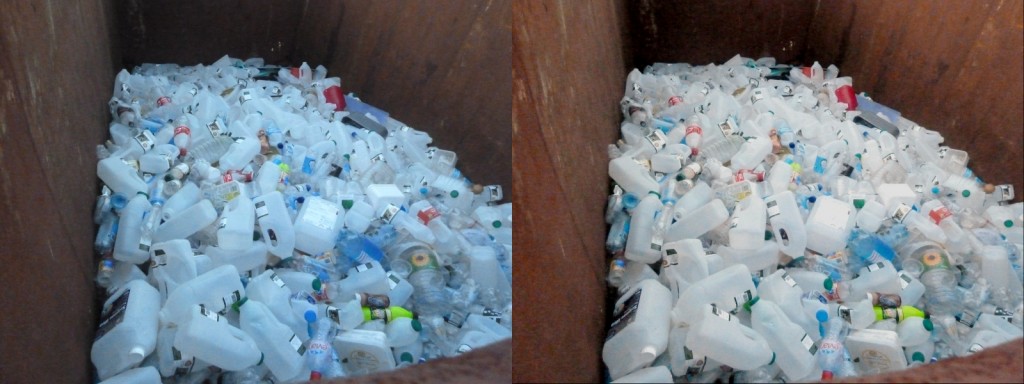
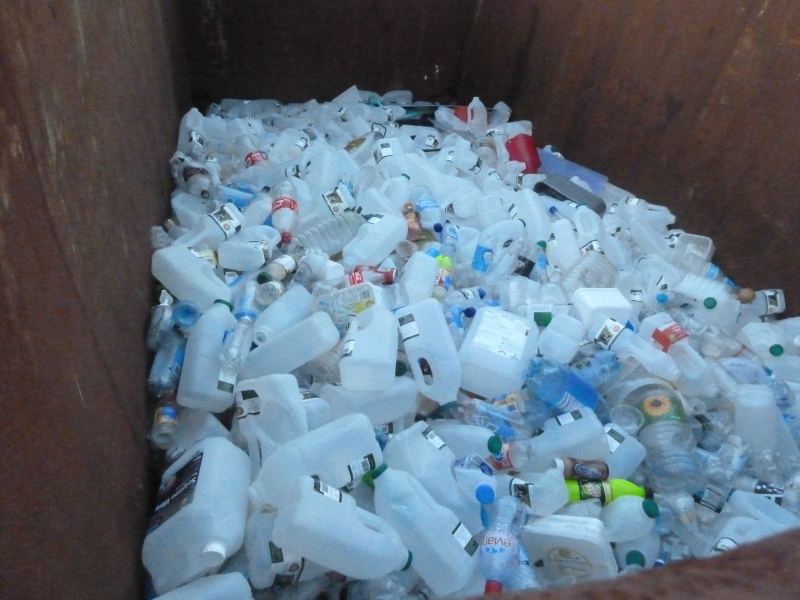
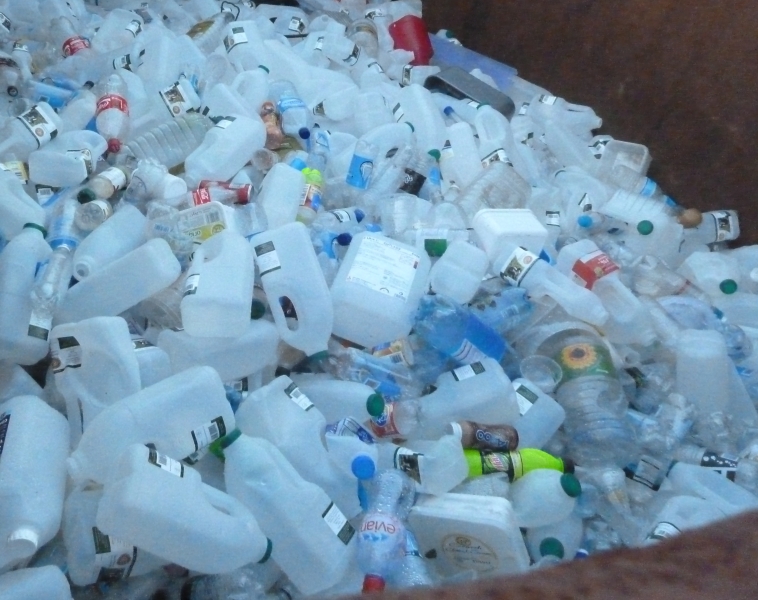
Big Rubbish Project: Eden Project 2011 by University of Exeter (hereafter called Big Rubbish). What can I say? Garbage is a versatile metaphor and images of garbage are useful. This image is visually striking: there’s lots of repetition and patterns, and not a lot of extraneous clutter in the surrounding scene. But it also has rather dim, flat colours.

A large pile of empty plastic milk containers inside a rusted metal container.
by University of Exeter

Step 1: crop

Old Computer has an issue with a lot of surrounding space; and SCUBA has two separate things going on in it. This we are going to fix by cropping the image. Cropping means cutting out some of the photo. Where possible, you want to cut out other unrelated objects, and large expanses of foreground and background.

Cropping principle: have the object of interest filling most of the photo, slightly off center.

In Pinta, select the Rectangle Select tool, drag to draw a rectangle over the bits of the image you want to keep, and then go to the Image menu and select Crop to Selection.

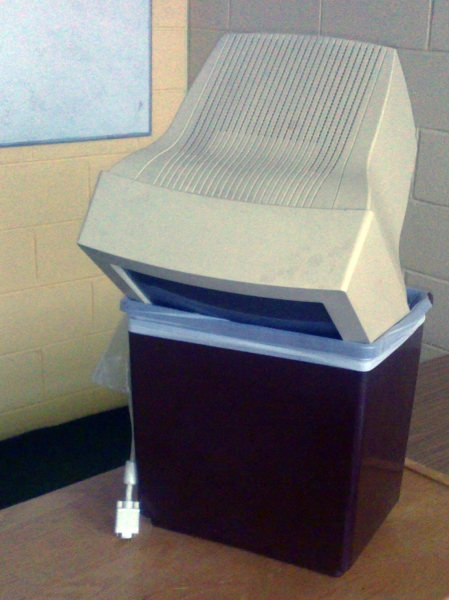
Old Computer, cropped so that the computer and the bin occupy much more of the image:

A computer monitor in a bin
by Sean MacEntee, cropped by Mary Gardiner

And two crops of SCUBA, the first showing the divers snorkelling at the top of the image and the second showing the divers grouped at the bottom:

Two divers snorkelling
by NickDun, cropped by Mary Gardiner, CC BY-SA
SCUBA divers groups at bottom of ocean
by NickDun, cropped by Mary Gardiner, CC BY-SA

Honestly I’m a bit sad to crop SCUBA, because the full image is so evocative of the last two or three minutes of SCUBA dives. Let this serve as a lesson: none of this editing is compulsory. Sometimes let less be more.

I’m even more loath to crop Big Rubbish, since as I noted at in its introduction I quite like its current framing. But one possibility with cropped is to change the message of the picture a little. For example, here’s a crop that implies that the extent of the garbage could be much larger:

A large pile of empty plastic milk containers
by University of Exeter, cropped by Mary Gardiner

An even tighter crop, taking out the edges on the bottom and right could imply that it wasn’t well contained.

Having made that illustrative crop, I’ll go back to working with the full version of Big Rubbish in future steps.

Further reading: Rule of Thirds for a guideline on centering or not centering your object of interest.

Step 2: auto level

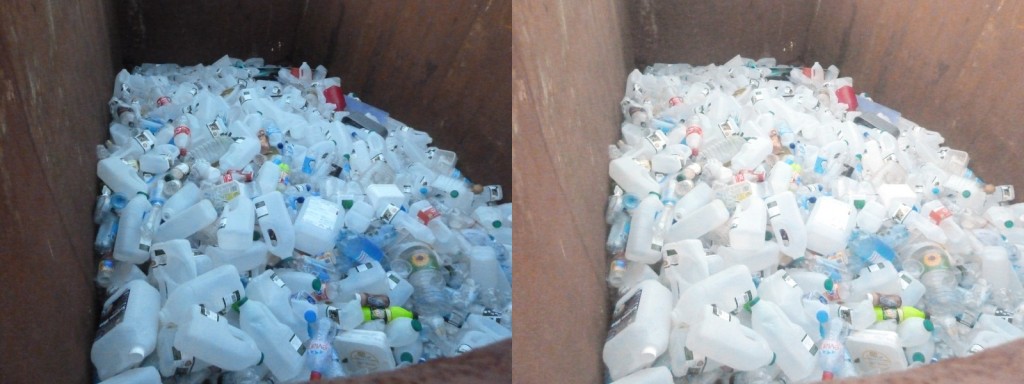
At the start, we saw that all of Old Computer, SCUBA, and Big Rubbish have “flat colours”. “Auto level” commands are the simplest way to get a good variety of colour levels to diminish this effect.

In Pinta, go to the Adjustments menu, and select Auto Level.

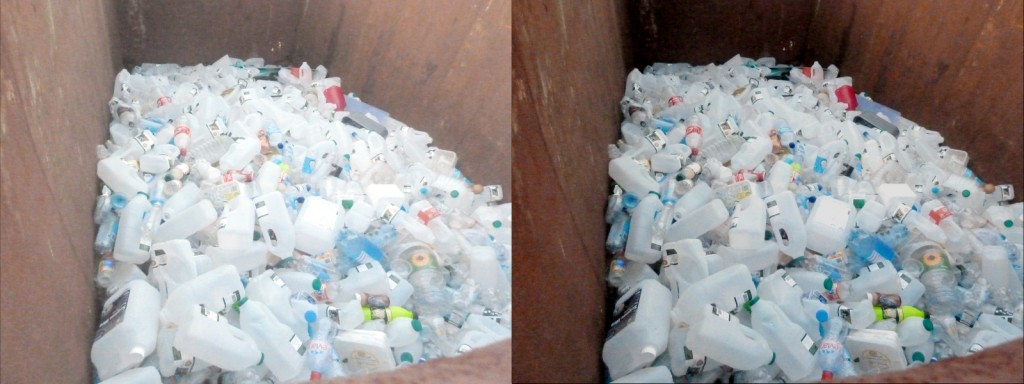
The effect on Big Rubbish is most dramatic and most of an improvement for eye-catching purposes (original on left, auto-levelled on right):

A large pile of empty plastic milk containers inside a rusted metal container.
by University of Exeter, duplicated and colour-adjusted by Mary Gardiner

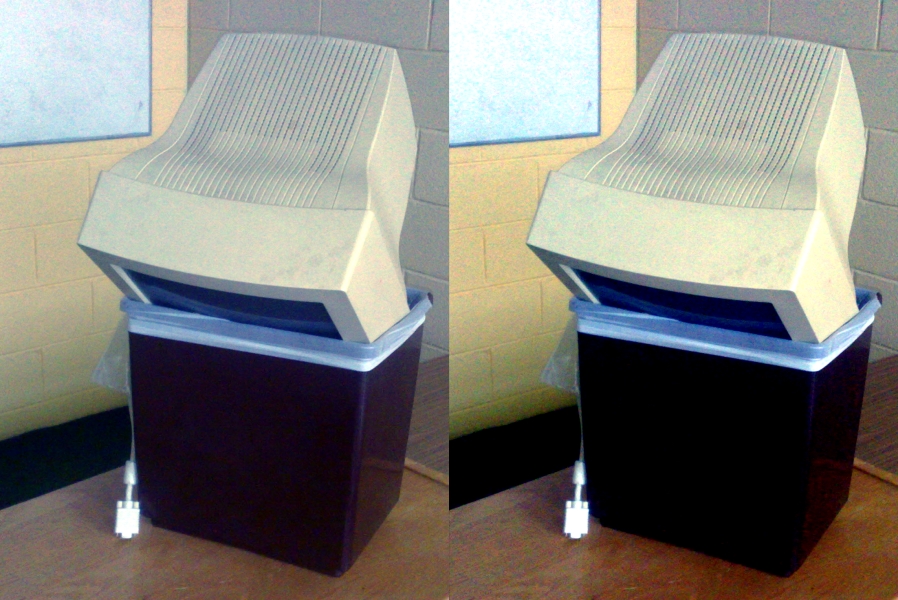
Contrary to (my) expectations, the effect on Old Computer is extremely subtle (original on left, auto-level on right):

Two images of a computer in a bin, with slightly different colours
by Sean MacEntee, cropped, duplicated, and colour adjusted by Mary Gardiner

But don’t worry, we’re not stopping here with jazzing up Old Computer.

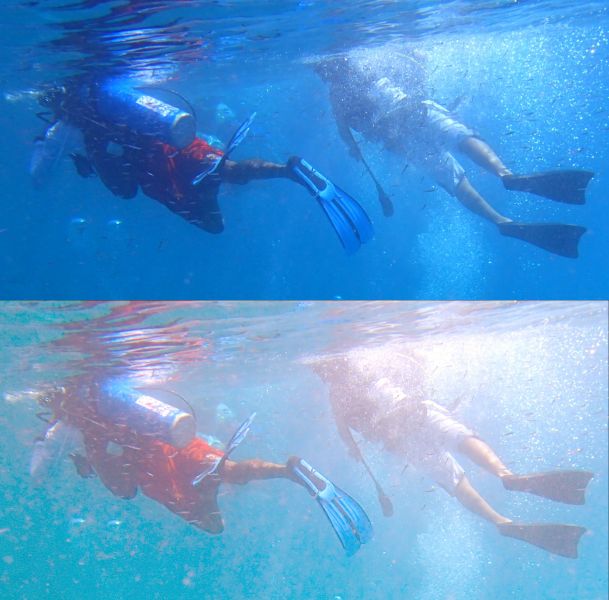
The effect on the two SCUBA shots is dramatic, as it often is with underwater shots. Here’s the top one (original image at top, auto-level at bottom):

Two images of two divers snorkelling, with slightly different colours
by NickDun, cropped, duplicated and colour-adjusted by Mary Gardiner, CC BY-SA

You’ll notice that while the range of colours in the auto-levelled picture is wider, it has not ended up looking especially realistic. Realistic high-fidelity underwater photographs are not easy to produce… but luckily realistic is not our goal here; our goal is striking.

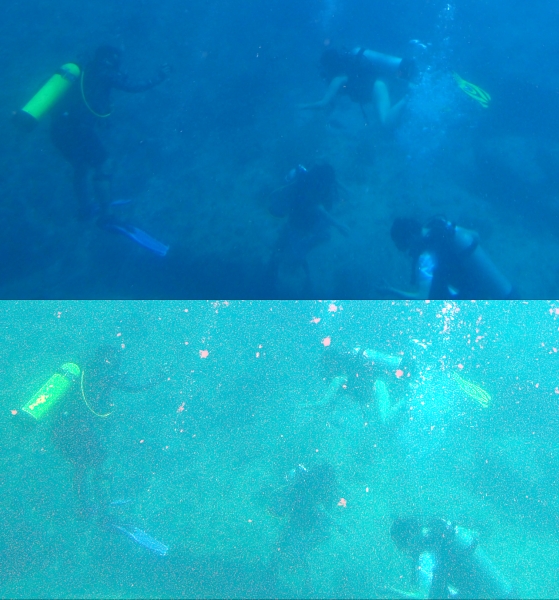
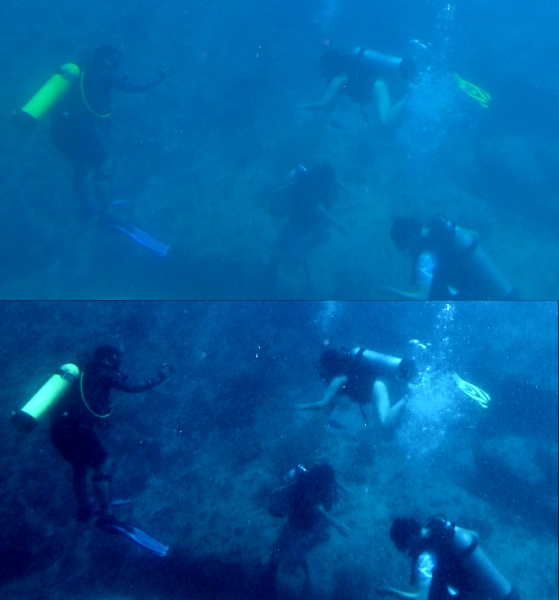
Sadly, the bottom crop of SCUBA is pushing the limits of colour adjustment: if there’s really only blue in the picture, auto-level will find red where-ever it can, no matter how ill-advised (original image at top, auto-level at bottom):

SCUBA divers groups at bottom of ocean; two images in slightly different colours
by NickDun, cropped, duplicated and colour-adjusted by Mary Gardiner, CC BY-SA

Not so great. But give auto-levelling a go with any picture you are trying to edit; there’s always an Undo command.

Step 3: increase contrast and saturation

Increasing contrast increases the distinctness of the colours in the image (beyond auto-level); and increasing saturation increases their richness.

In Pinta, go to the Adjustments menu, and choose “Brightness / Contrast” for a contrast slider, and “Hue / Saturation” for a saturation slider.

Here’s Old Computer, with the Saturation slider (which starts at 100) increased to 150, and the Contrast slider (which starts at 0) increased to 30 (auto-levelled version on left, higher contrast and saturation version on right):

Two images of a computer in a bin, with different colours
by Sean MacEntee, cropped, duplicated, and colour adjusted by Mary Gardiner

And here’s Big Rubbish, with three adjustments. I took Saturation to 130, contrast up to 20, and brightness down to -50 (auto-levelled version on left, higher contrast, higher saturation version, and lower brightness version on right):

by University of Exeter, duplicated and colour-adjusted by Mary Gardiner

Since I’ve made it darker again, and thus more like the original, let’s keep ourselves honest and compare with the original too (original on left, auto-levelled with lower brightness, higher contrast, and higher saturation version on right):

A large pile of empty plastic milk containers, two version with different colours
by University of Exeter, duplicated and colour-adjusted by Mary Gardiner

Our version has a lot more red: the bottles are white rather than blue, and the rusty bin has a warm red tone (partly due to auto-levelling and partly due to increasing the saturation dramatically). So auto-levelling and messing with the colours paid off even though I went and reduced the brightness back down to close to the original.

Saturation is a very powerful slider: make your colours richer by increasing saturation.

That said, sometimes you can do a lot just with contrast. Remember what a mess auto-levelling made of the bottom SCUBA picture? I didn’t give up there. Here’s a version based on the original, with brightness increased to 20 and contrast to 70 (original crop on top, higher contrast and higher brightness version on bottom):

Two images of SCUBA divers groups at bottom of ocean with slightly different colours
by NickDun, cropped, duplicated and colour-adjusted by Mary Gardiner, CC BY-SA

Here manually fiddling with brightness and contrast has pulled some detail out of the picture that auto-levelling didn’t manage to find, and made it much more striking while retaining the other-worldly darkness of SCUBA diving. (Spoiler: your eyes are better than cameras at adjusting, it doesn’t seem that dark while you’re doing it. But you might want to convince your readers or listeners that it is spooky-dark…)

Step three alternative: decrease saturation

Upping saturation to make your rust warm, and your water an inviting sunny-day blue can be very effective, but it’s also worth checking out what effect you get from dialling saturation both ways.

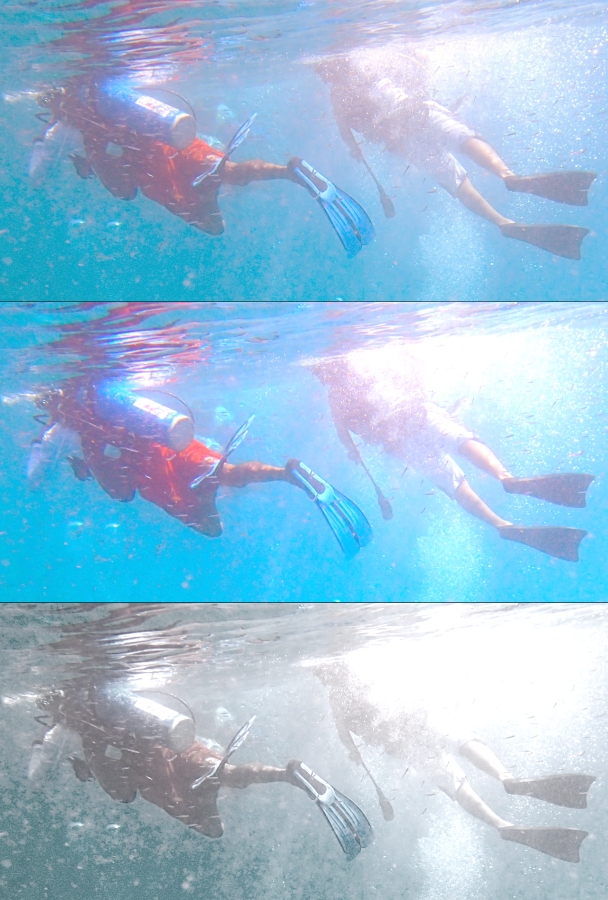
Here’s the top of the SCUBA shot (top version auto-levelled, middle version auto-levelled with contrast increased to 20 and saturation increased to 155, bottom version with contrast increased to 35 and saturation decreased to 25):

Three images of two divers snorkelling, with different colours
by NickDun, cropped, duplicated and colour-adjusted by Mary Gardiner, CC BY-SA

Both of the edits have something to recommend them: the more saturated version in the middle looks like the sunniest dive day in the history of time, and the less saturated version at the bottom looks ethereal and dramatic; my favourite edit that I produced for this post. Try dialling saturation down sometimes, not always and forever up.

And that’s it: you have your basic dials to catch eyes now!

Two minutes to more eye-catching photos

Full disclosure: you’ll have to do a bit of practice to develop your own taste. But here’s your quick steps when you have a photo that could use a bit of “pop” before being added to your writing or your slide deck:

  1. crop the image so that the subject of interest comprises most of the image, and is off-center
  2. try auto-level colour adjustments
  3. try somewhat increasing one or more of contrast and saturation, perhaps while twiddling brightness up or down
  4. also try decreasing saturation

And so wordsmith types: go forth and give people brain candy!

Creative Commons License
Eye-catching graphics in two minutes: a wordsmith’s guide by Mary Gardiner is licensed under a Creative Commons Attribution-ShareAlike 4.0 International License.